Sepasoft MES Module Suite
Production Equipment Manager in Vision
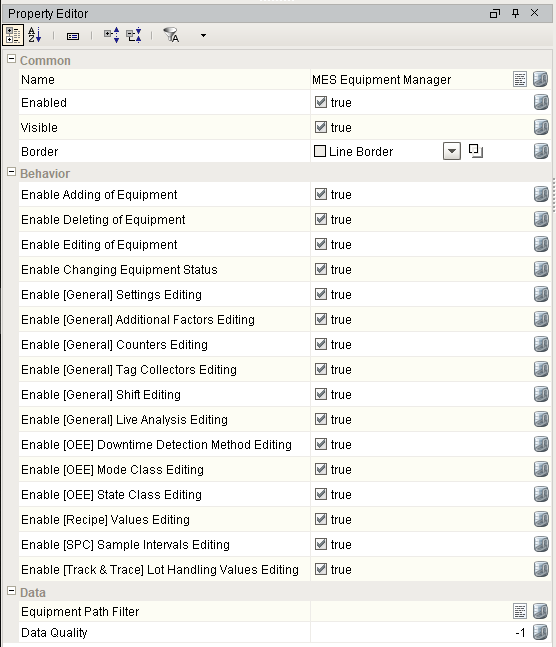
The MES Equipment Manager component has several properties that control its behavior. For configuration, see Configuring the UI.
In the Property Editor, the following settings are available:
| Property Name | Description |
|
Enabled |
Enables or disabled the MES Equipment Manager component. When disabled, a user is unable to interact with it in any way. |
|
Enable Adding of Equipment |
When true, a user may add new equipment. This includes via the menu or by pasting. |
|
Enable Deleting of Equipment |
When true, a user is able to delete equipment. |
|---|---|
|
Enable Editing of Equipment |
When true, a user is able to edit (move, rename) equipment. |
|
Enable Changing Equipment Status |
When true, a user is able to enable or disable equipment. |
|
Enable [General] Settings Editing |
When true, the Settings menu option under "General" is displayed, when applicable. |
|
Enable [General] Additional Factors Editing |
When true, the Additional Factors menu option under "General" is displayed, when applicable. |
|
Enable [General] Counters Editing |
When true, the Settings menu option under "Counters" is displayed, when applicable. |
|
Enable [General] Tag Collectors Editing |
When true, the tag Collectors menu option under "General" is displayed, when applicable. |
|
Enable [General] Shift Editing |
When true, the Shift menu option under "General" is displayed, when applicable. |
|
Enable [General] Live Analysis Editing |
When true, the Live Analysis menu option under "General" is displayed, when applicable. |
|
Enable [OEE] Downtime Detection Method Editing |
When true, the Downtime Detection Method menu option under "OEE" is displayed, when applicable. |
|
Enable [OEE] Mode Class Editing |
When true, the Mode Class menu option under "OEE" is displayed, when applicable. |
|
Enable [OEE] State Class Editing |
When true, the State Class menu option under "OEE" is displayed, when applicable. |
|
Enable [Recipe] Values Editing |
When true, the Values menu option under "Recipe" is displayed, when applicable. |
|
Enable [SPC] Sample Intervals Editing |
When true, the Sample Intervals menu option under "SPC" is displayed, when applicable. |
|
Enable [Track & Trace] Lot Handling Editing |
When true, the Lot Handling menu option under "Track & Trace" is displayed, when applicable. |
Vision Equipment Manager Properties in Designer
Default Property Values
Sepasoft MES Module Suite