Sepasoft MES Module Suite
E-Signature
Sepasoft E-Signature provides certified approval or rejection using Ignition authentication and security-zones. Templates for saved behaviors based on scenarios.
- When one of the reviewers rejects, the message is rejected (as of MES 3.81.9 SP3).
User roles as well as individual user-names can be added. In Batch Procedure, use the e-signature phase and components to track: who did what and when. Tracking can be configured at the phase level down to machine commands. You must first set up an e-Signature Template. When using with Batch Procedure, you assign that template to an e-Signature Phase by selecting the template in the phase edit configuration view.
Ignition Identity Providers and Security Zones set in the Ignition Gateway.
Define your own templates with Expressions. Expression syntax logic-operators: AND, OR define Authorization Challenges, which are based on login configuration in.
Programmatic E-Signature Workflows
The system.mes.signature.authorization scripting functions provides the essential tools to programmatically manage and enforce electronic signature workflows within the MES. These functions are a critical component for ensuring process integrity, adhering to compliance standards, and automating user-level approvals. By leveraging this module, you can build robust, event-driven signature challenges directly into your industrial applications.
See system.mes.signature.authorization
E-Signature Components
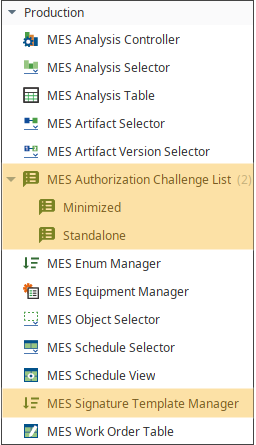
Below is a summary of each component. Components are shown in the order that they are displayed in the Perspective Component palette in Ignition Designer.
Version Specific

|
E-Signature is supported in 3.81.6 RC 1 and later. |
Perspective Components > Production
| Use this component: | To: |
|---|---|
| MES Authorization Challenge List - Minimized |
List challenges based on template rules. |
| MES Authorization Challenge List - Standalone | |
| MES Signature Template Manager |
Create a template with challenge rules. |
FR21 Part 11 Code FDA Compliance

|
Compliance with CFR21 Part 11 Code FDA regulations. For more information about those federal regulations, see CFR21 Part 11 Code Compliance with Ignition. |
Version Specific
|
|
E-Signature is supported in 3.81.6 RC 1 and later. Integrated in the GUI and provided when installing the Production Module. Perspective Only Component: See Perspective next generation visualization system. |
Sepasoft MES Module Suite