Sepasoft MES Module Suite
Equipment Phase
You can create and configure an Equipment Phase in Batch Phase Manager and through scripting using the Phase object class methods.
Equipment Phase Default Parameters
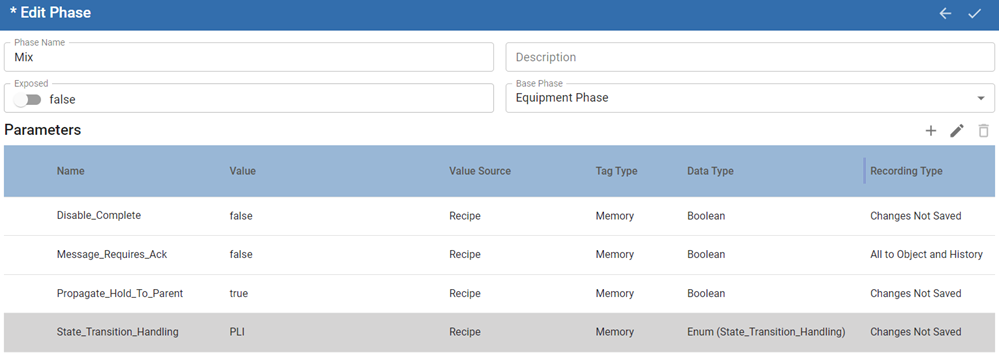
See Properties Common to All Phase Parameters
| Property Name | Value | Value Source | Tag Type | Data Type | Recording Type | Description |
|---|---|---|---|---|---|---|
| Disable_Complete | True/False Defaults to False. | Recipe | Memory | Boolean | Changes Not Saved | Controls the completion or continuation of the running of step (all recipe structures supported for example: Unit Procedure > Operation > Recipe). |
| Message_Requires_Ack | Defaults to False. | Recipe | Memory | Boolean | All to Object and History | |
| Propegate_Hold_To_Parent | Defaults to True. | Recipe | Memory | Boolean | Changes Not Saved | |
| State_Transition_Handling | PLI/Auto Defaults to PLI. | Recipe | Memory | Enum (State_Transition_Handling) | Changes Not Saved | Sets the handling of the equipment phase. PLI - expects a notification coming from a PLI. Auto - does not expect a notification from a PLI. Other sources within the application layer can notify handling. |
Equipment Phase Parameter Properties
Editing, adding, deleting parameters happen in Batch Phase Manager and/or through scripts.
You can define the Tag Type for each parameter added to a phase.
In Batch Phase Manager:
- To add a parameter, click the Plus icon.
- To edit a parameter, select in the Parameter List and click the Pencil icon.
- To delete a parameter, click the Trash icon.
To see the component interface, see Batch Phase Manager.
For use, see Adding and Configuring Equipment Phases.
Sepasoft MES Module Suite