Sepasoft MES Module Suite
Exporting the Production Equipment Model
Every production item in the production model (site, area, line, cell group, cell, location) is considered by Ignition as a separate global resource. This allows multiple developers to be working on different production item configurations at the same time.
Export Global
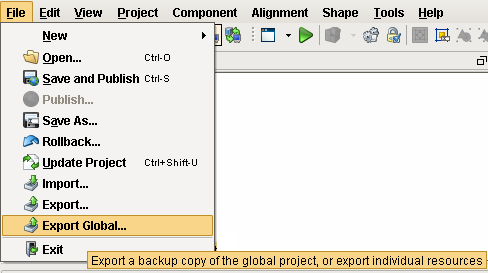
Ignition provides the ability to export global resources using the File > Export Global menu item.
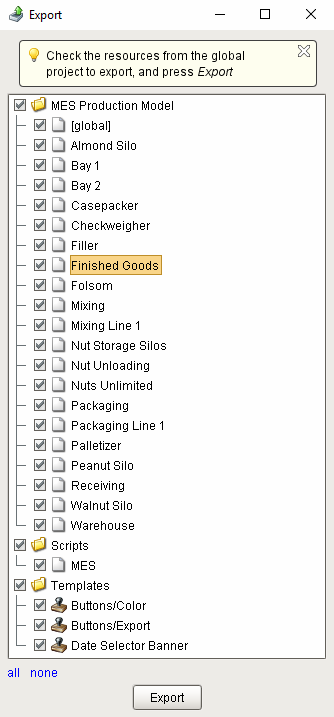
The MES Production Model export screen flattens out the production model which can make it difficult to select certain items particularly if different production items have the same name, however this method works well when you need to export the entire production model from one gateway to another.
Copy and Paste
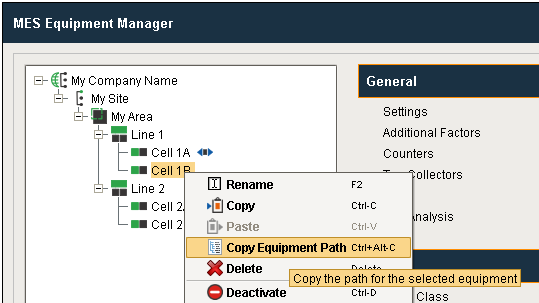
When you want to make a copy of a production item with associated production items beneath it, you can right-click on the production item and select Copy, then select the production item one level up from the copied production item, right-click and select Paste. This works at the site, area, line, cell group, cell and location level, and also works when making a copy in the same gateway or from one gateway to another gateway.
Parameterized Tag Paths
When you have an implementation that has many identical production lines, the ability to copy and paste along with Parameterized Tag Paths provides a fast method for duplicating lines with dynamic binding to the tag source of data. By building a standard interface between the PLC logic and ignition tag structure, you can configure once and rollout to many lines.
For more information, refer to the Parameterized Tag Paths help.
Sepasoft MES Module Suite