Sepasoft MES Module Suite
Resource Object | Manifest Objects
In a factory environment, materials are often transported in bulk (e.g., by truck) between manufacturing sites. The Sepasoft Track & Trace module provides the idea of Manifests to accomplish this in the system.
Material Lots are represented in bulk between Ignition Gateways using a Manifest Object to 'hold' materials that are reassigned to another Ignition Gateway. This movement of material can occur among any gateway in an Enterprise Network.
Unlike a piece of Supplemental Equipment, which can be refilled again and again, a Manifest Object is intended to be created, and used to 'transport' Material Lot objects to another gateway one time, and then be discarded (automatically becomes disabled after use).
There are two associated Object Types in the Manifest Objects group, Manifest Class and Manifest.
All of these objects inherit the AbstractMESObject properties and methods.
Object Versions
Every time a Manifest or ManifestClass Object is modified, i.e. adding custom properties, changing a setting etc., the version number of that equipment object is updated in the background. When an operation is scheduled, it checks for a corresponding Response Object version. If one does not exist, it automatically creates a new Response object.
This versioning is not part of ISA-95, however, without it, analysis of historical data would lose the original configuration of equipment, personnel and materials.
ResponseManifest and ResponseManifestClass objects are automatically created by operations and are used for traceability analysis.
Manifest Class and ResponseManifestClass Objects
This object is used to group Manifest Objects into a category. It can have Manifest or other ManifestClass objects as children. This Class object is convenient for categorizing Manifests by content type or usage
This object inherits the AbstractMESObject properties and methods, but does not extend them.
Manifest and ResponseManifest Objects
The Manifest Object cannot have children assigned. After being loaded with Material Lots, they are considered single-use 'transport' devices to move materials to storage locations on another gateway (usually another factory Site). This object is not intended for 'transporting' materials to storage locations within the same gateway (Site).
Object Creation
Manifests and Manifest Classes are created using the MES Object Editor component, or via scripting using the following function:
Creating Manifest Objects via Scripting Example
|
manifestClass = system.mes.createMESObject('ManifestClass')
manifestClass.setPropertyValue('Name', 'My Scripted Manifest Class')
system.mes.saveMESObject(manifestClass)
manifest = system.mes.createMESObject('Manifest')
manifest.setPropertyValue('Name', 'My Scripted Manifest')
system.mes.saveMESObject(manifest)
man = system.mes.loadMESObject('My Scripted Manifest', 'Manifest')
manClass = system.mes.loadMESObject('My Scripted Manifest Class', 'ManifestClass')
manClass.addChild(man)
system.mes.saveMESObject(manClass)
|
Displays in the MES Object Editor:
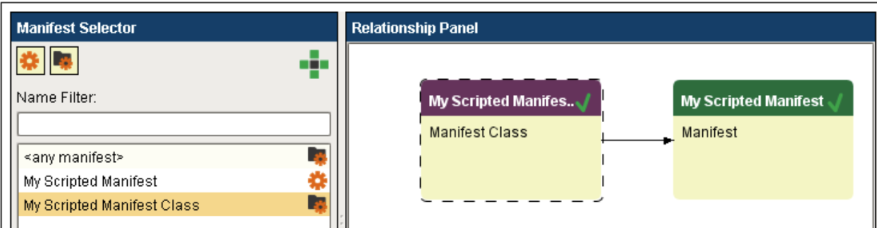
Object Properties
This object inherits the AbstractMESObject properties.
Object Functions
getAllLots()
Get the MESMaterialLot objects for all Material Lots in the Manifest.
getAllLots()
None
Collection<MESMaterialLot> result - A list of all Material Lots in the Manifest.
All
|
manifest_name = event.source.parent.getComponent('Manifest Selector').selectedName
manifest = system.mes.loadMESObject(manifest_name, "Manifest")
print manifest.getAllLots()
|
[MaterialLot (5fcb36e8-6543-43e7-a67f-91be9f5bd899, Site 1-0000000001, 0 parents, 0 children, 0 custom properties, 1 complex properties, artifacts not loaded), MaterialLot (3cf476c5-c2cc-4ce0-8337-309653e8a905, Site 1-0000000002, 0 parents, 0 children, 0 custom properties, 1 complex properties, artifacts not loaded), MaterialLot (0ab31b25-7ee2-400f-8dea-8b3154b1be23, Site 1-0000000004, 0 parents, 0 children, 0 custom properties, 1 complex properties, artifacts not loaded), MaterialLot (15b62cdf-2c74-406e-85c7-ea5ee0ad799b, Site 2-0000000003, 0 parents, 0 children, 0 custom properties, 1 complex properties, artifacts not loaded), MaterialLot (a7e365b0-ca42-44c6-8572-037cfe261dc3, Site 2-0000000005, 0 parents, 0 children, 0 custom properties, 1 complex properties, artifacts not loaded), MaterialLot (90194033-ffae-43d2-ab73-6d37ba5e24a9, Site 2-0000000006, 0 parents, 0 children, 0 custom properties, 1 complex properties, artifacts not loaded)]
|
getAvailableLots()
Get the MESMaterialLot objects for all available Material Lots in the Manifest.
getAvailableLots()
None
Collection<MESMaterialLot> result - A list of all available Material Lots in the Manifest.
All
|
manifest_name = event.source.parent.getComponent('Manifest Selector').selectedName
manifest = system.mes.loadMESObject(manifest_name, "Manifest")
print manifest.getAvailableLots()
|
[MaterialLot (b3fb0d63-6ac9-4a20-9ec9-2b4d7bc9c307, Site 1-0000000002, 0 parents, 0 children, 0 custom properties, 1 complex properties, 0 artifacts), MaterialLot (406019ec-799c-4fb1-a754-de904048e3a2, Site 1-0000000004, 0 parents, 0 children, 0 custom properties, 1 complex properties, artifacts not loaded), MaterialLot (a7e365b0-ca42-44c6-8572-037cfe261dc3, Site 2-0000000005, 0 parents, 0 children, 0 custom properties, 1 complex properties, artifacts not loaded)]
|
getLotLinks(availableLotsOnly)
Get MESObjectLinks for all (or all available) Material Lots in this Manifest.
getLotLinks(availableLotsOnly)
Boolean availableLotsOnly — Limits results to available Material Lots only, when True. Must supply either True or False.
Collection<MESObjectLink> result - A list of MESObjectLinks for all (or all available) Material Lots in the Manifest.
All
|
manifest_name = event.source.parent.getComponent('Manifest Selector').selectedName
manifest = system.mes.loadMESObject(manifest_name, "Manifest")
print "Lot Links of Manifest = ", manifest.getLotLinks(False)
|
Lot Links of Manifest = Size 6
|
getManifestLocation()
Gets the Equipment Path for where the Manifest is located.
getManifestLocation()
None
String manifestPath — The Equipment Path where the Manifest is located.
All
|
manifest_name = event.source.parent.getComponent('Manifest Selector').selectedName
manifest = system.mes.loadMESObject(manifest_name, "Manifest")
print "Manifest is located at:", manifest.getManifestLocation()
|
Manifest is located at: WidgetsInc\Site 2
|
getManifestState()
Returns the state of the Manifest (either "AVAILABLE" or "USED"). When all Material Lots have been unloaded from a Manifest, the state turns to "USED" and the Manifest Object is set to disabled.
getManifestState()
None
String manifestState — The state of the Manifest Object (either "AVAILABLE" or "USED").
All
|
manifest_name = event.source.parent.getComponent('Manifest Selector').selectedName
manifest = system.mes.loadMESObject(manifest_name, "Manifest")
print "State of selected Manifest = ", manifest.getManifestState()
|
State of selected Manifest = AVAILABLE
|
setManifestState(manifestState)
Sets the state of the Manifest to either "AVAILABLE" or "USED".
setManifestState(manifestState)
String manifestState — The state to apply to the Manifest. Choices are "AVAILABLE" and "USED".
Nothing
All
|
manifest_name = event.source.parent.getComponent('Manifest Selector').selectedName
manifest = system.mes.loadMESObject(manifest_name, "Manifest")
manifest setManifestState('Used')
print "State of selected Manifest = ", manifest.getManifestState()
|
State of selected Manifest = USED
|
transfer(destinationPath)
The Manifest (with all on-board Material Lots) will be removed from the current Site (source gateway) and added to the destination Site (destination gateway).
transfer(destinationPath)
String destinationPath — equipment path to the destination Site on another gateway (e.g. "WidgetsInc\Site 1")
Nothing
All
|
site_path = event.source.parent.getComponent('Site Path Field').text
manifest_name = event.source.parent.getComponent('Manifest Selector').selectedName
manifest = system.mes.loadMESObject(manifest_name, "Manifest")
manifest.transfer(site_path)
system.mes.saveMESObject(manifest)
|
This object also inherits the AbstractMESObject functions.
Object Events
This object inherits the AbstractMESObject events.
Sepasoft MES Module Suite