Sepasoft MES Module Suite
Material Lot
A Material Lot object represents a grouping of Material that you define. You can define the grouping suited to your solution using simple lots like 'scrap' or more complex such as:
- A batch of product (Material Definitions in system)
- Each with their own unique serial number (Material Sublot in system)
- Can only be stored in a certain box, on a certain pallet, in a certain building (Load Lot by Equipment Path to Storage Unit in system)
- To the point the Material Lot is considered “Ready to Ship” (Lot Status in the system OEE, SPC,Trace, Batch Procedure).
Material Lot objects may be consumed and/or created whenever a response segment is executed for all modules (except Batch Procedure. Batch Procedure does not use the Response object). The Response object holds information about the Material Lot and can have Material Sublot objects as children.
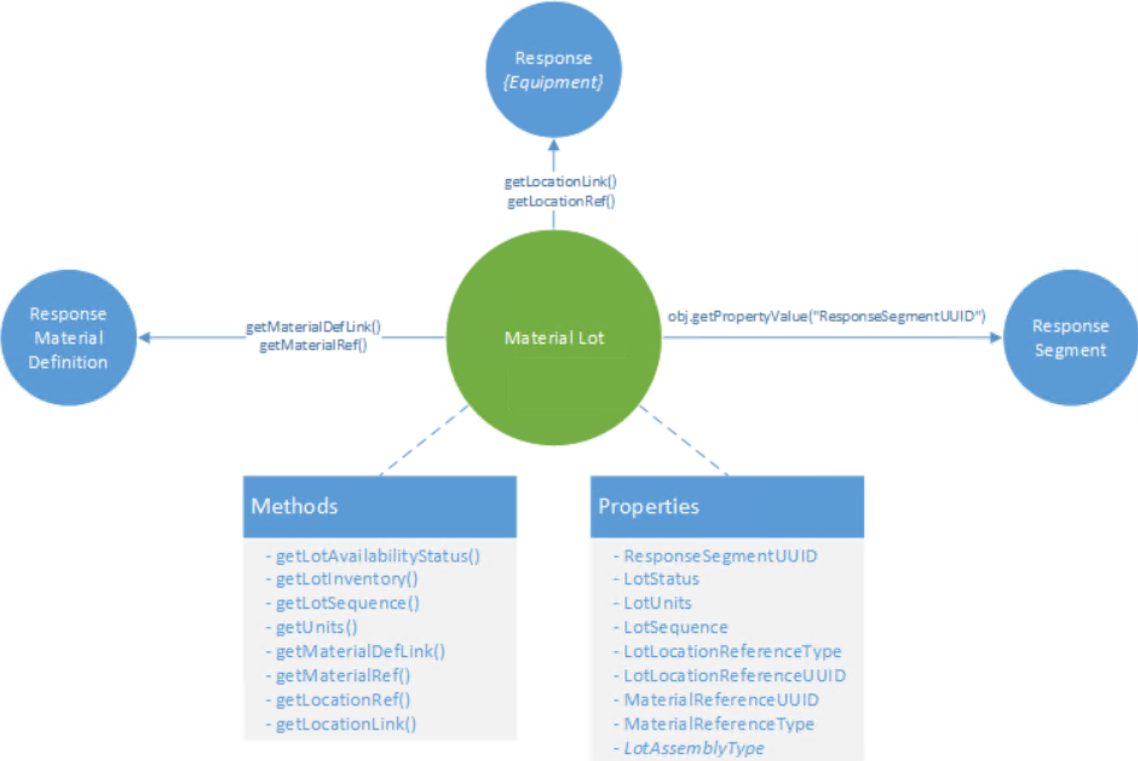
The Material Lot object stores references and links to other objects associated with it. Object functions are provided that allow you to access the Response Segment that created the Material Lot, the Response Material Definition for the Material Lot and the Response Equipment (i.e. Response Storage Unit), where the Material Lot is located.
The Material Lot Object is derived from the AbstractMESObject and inherits all the exposed properties, methods and events for that object.
Material Sublots
When a segment is started, a Material Lot object is created for the OUT material. If the parts being produced by that segment are serialized, a Material Sublot object can be created for each serialized part that are associated with the Material Lot. The Material Sublots can be traced back throughout the process and show up as a highlight on the Material Lot object on the Trace Graph View. Creating Material Sublots is much more efficient than executing a process segment for each part produced. However re-introducing sublots back into a manufacturing process for re-work provides some challenges for traceability.
See Material Sublot Object for more information.
Python |
obj = system.mes.loadMESObject('2dce886c-8ce6-4aeb-b271-62adc07a6f26') #Return a Material lot object obj.getChildCollection().getList() |
Material Lot Quantities
Material Lot Objects do not hold the quantity of material in that lot. The quantity consumed or created is kept in the Lot Resource properties of the Response Segment object which provides a mechanism for determining how much of a material lot was consumed or created by a given Response Segment.
In order to find out how much material remains in a lot, the material lot object method obj.getLotInventory().getNetQuantity() queries each of the response segments that have touched the Material Lot object to return the remaining lot quantity.
References versus Links
The Material Lot object provides two methods to obtain the associated Response Material Definition and Response {Equipment} objects. getLocationLink() and getMaterialDefLink() both return a lightweight object that can then be used to access the actual object i.e. getLocationLink().getMESObject() whereas getLocationRef() and getMaterialRef() return an AbstractMESObjectReferenceProperty object.
It is recommended to always use the ...Link() method as this provides a faster way of getting to the object directly, however, be advised that ...link().getMESObject() will throw the error Information is missing for response material location reference if either the UUID or Type is missing for the returned MESObject. getLocationRef() will not throw an error and allows you to access an object that has only one of the UUID or Type parameters set. This error generally only occurs if deriveMESObject() or createMESObject() was used to create an MES object without setting up all the necessary parameters. Using process segments to create the MES Objects will ensure that the objects have the parameters correctly setup.
Object Creation
Material lots are automatically created when the Auto Generate Lot property of the process segment is to True through the MES Object Editor component and a response segment is created.
It can also be created manually using the following object functions:
- Response Segment .setMaterial()
Use
The following scripting functions return a Material Lot object:
- system.mes.loadMaterialLot()
The following object functions return this object:
- MES Lot Quantity Summary Item object.getMaterialLot()
- Response Segment object.getMaterialLot()
- MES Response Material Property object.getMaterialLot()
Object Properties
|
Scripting
|
R/W
|
Description
|
||||||||
|---|---|---|---|---|---|---|---|---|---|---|
| MaterialRefUUID | Read | The UUID of the Material Definition assigned to the Material Lot object. | ||||||||
| MaterialRefType | Read | The type of the Material Definition object assigned to the Material Lot object. i.e. ResponseMaterialDef | ||||||||
| ResponseSegmentUUID | Read | The UUID of the Response Segment that created the Material Lot object. This is not supported with system.mes.trace.recordOperation(). | ||||||||
| LotAssemblyType | Read | Currently this is here for reference and is included to align with the ISA-95 standard and will become significant in the next phase of the Track and Trace Module. | ||||||||
| LotAvailabilityStatus |
Read/Write |
Returns the availability status of the lot. Default is Available.
Available - Material Lot is currently available Used - Material Lot has been used up |
||||||||
| LotStatus | Read/Write |
The state of the Lot Status property of the Material Lot object changes from Active to Complete. During processing, the system sets the state to Active and cannot be changed. You can use a user-defined value for the final status of Complete. To do this, you set the Final Lot Status property in the Operation Segment configuration. If not set, the system sets Lot Status to Complete.
Customize Lot Status to provide context and filtering Providing Context Often there are a vast number of operations in an MES system and this can make it difficult to determine what stage your lot is in the process. Lot Status can bring context to where the lot is in your process. Once again the implementation of this can be extremely simple or extremely complex. For instance, your Lot Status for a painting operation can be “Finished”. Or, if the lot undergoes a series of processes, your Lot Status could be something like “Finished Step 35”. Filtering Another powerful use of Lot Status is in filtering your lots. For instance, if after your lot passes inspection you set the Lot Status to “QC Complete” you can search for all lots in a given storage unit with the Lot Status of “QC Complete”. |
||||||||
| LotLocationRefType | Read/Write | This is the type of equipment object where the lot is located i.e. ResponseStorageUnit | ||||||||
| LotLocationRefUUID | Read | This is the UUID for the specific equipment of where the lot is located i.e. 6d15732b-5d64-41d7-a596-9ccef8eead15 | ||||||||
| LotUnits | Read/Write | The unit defined for the lot quantity. Notice, that this is not a quantity setting for the Material Lot object. This is because the quantities are kept in the lot resource properties of the Response Segment object. The reason for this is that a many Response Segments may pull product from a single lot and it will have to be continually updated. In addition, details of how much a given Response Segment used of a lot still has to be maintained and storing quantities in the Material Lot object will be redundant which is never good. | ||||||||
| LotSequence | Read/Write | The sequence property is incremented every time a new Material Lot is created for a given lot number. This makes it unique as an unchanging lot number flows through a manufacturing facility. |
This object inherits the AbstractMESObject properties...
Object Functions vs PropertiesProperty values can be accessed and changed for an object by using the getPropertyValue() and setPropertyValue() method.
The object also provides a set of functions that can be called to return object properties such as obj.getUnits() or obj.getLotAvailabilityStatus(). These functions are recommended over directly accessing object properties using the obj.getPropertyValue("LotStatus"). The reason for this is because of subtle differences between the value returned by the function and the property. As an example, obj.getLotAvailabilityStatus() returns the enumerated type AVAILABLE whereas myobj.getPropertyValue('LotAvailabilityStatus') returns the string Available. It is recommended to only access properties when no function exists to obtain the value of the property.
Object Functions
- getLocationLink()
- getLocationRef(()
- getLotAvailabilityStatus()
- getLotInventory()
- getLotSequence()
- getMaterialDefLink()
- getMaterialRef()
- getUnits()
- setLotSequence(lotSequence)
- setUnits(lotUnits)
This object inherits the AbstractMESObject functions.
Object Events
Objects have events associated with them that allow for custom scripts to be added whenever the event occurs. Refer to MES Object Events for more information.
This object inherits the AbstractMESObject events.
|
Event Name
|
Description
|
|---|---|
| CreateLotNumber |
This event is run every time a Material Lot object is requested to create a new lot number. This event provides a method to intercept the generation of lot numbers so that the format of the lot number or even the number itself can be modified. For systems that retrieve lot numbers from a ERP or other system, this event will allow obtaining a lot number from it. Script in this event can also read from a block of available lot numbers that are maintained in a database. |
| EvaluateLotStatus |
The event is fired when a Material Lot is being finalized in a segment operation with a quantity and/or status change. If no script is entered, then the default handler will be executed. To execute the default handler from within the script entered here, add a script line: event.runDefaultHandler() |
| New |
The event is fired when a new instance of a Material Lot MES object is created. If no script is entered, then the default handler will be executed. To execute the default handler from within the script entered here, add a script line: event.runDefaultHandler() |
Sepasoft MES Module Suite