Sepasoft MES Module Suite
Analysis Dataset Controller
Analysis Controller is a hidden component in runtime that brings in a dataset from any binding type making analysis data available for reports and other components.
Installed with Production Module for Vision and Perspective.
Ignition Designer Component Palette > Production >MES Analysis Controller.
To set up drilldown, see: Setting Up Analysis Drilldown Functionality.
Component Properties
Note that, in Perspective, the analysis filter values cannot be edited in the PROPS section, as they could be in the Data properties section in the Vision version of the MES Analysis Controller ( Filter By , Group By , etc. are no longer available). However, a configurable equipment path can created in filterParams in the designer property palette that allows you to run an analysis filtered by the provided equipment path (example: eqPath ), then change the equipment path value and view results for that new equipment path.
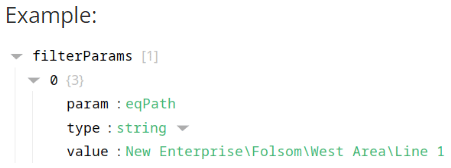
Set a property
Python |
self.getSibling("mesAnalysisController").props.drillDownBreadCrumb = True self.getSibling("mesAnalysisController").props.filterParams[0].value = 'New Enterprise\Folsom' |
Component Functions
If this component has been dropped onto root of a View, then the path is self.getSibling('mesAnalysisController').clearDrillDownHistory().
clearDrillDownHistory
- Description
Removes the drill down history .
- Parameters
None
- Return
Nothing
- Scope
Client
drillDown(compareByName, filterValue)
Sets all the analysis selections to new state dictated by the drill down definition.
- Parameters
String compareByName - The compareBy definition to base the drill down .
String filtervalue - The value for filtering the analysis selections.
- Return
Nothing
- Scope
Client
prevDrillDown
Sets all the analysis selections to the previous state before the last drill down.
- Parameters
None
- Return
Nothing
- Scope
Client
executeAnalysis()
Causes analysis results to update with current result.
- Parameters
None
- Return
Nothing
- Scope
Client
Sepasoft MES Module Suite