Sepasoft MES Module Suite
MES Equipment State Object
Equipment states allow raw equipment status coming from a PLC to maintain its finite state machine. You can analyze cycle time and more. Grouping equipment states coming from the PLC status, such as Loading, Heating, Purging, etc., can be considered as Running in a system using OEE.
Derived from the AbstractMESObject inheriting all properties, functions and events.
No components use this object directly.
See Below:
- MES Equipment State Object
- Default State Types
- MES Equipment State Object Creation
- Create via Scripting
- Object Properties
- MESEquipmentState Object Functions
- getStateCode()
- getStateOverrideScope()
- getStateOverrideSetting()
- getStateShortStopThreshold()
- getStateType()
- getStateTypeName()
- isOverrideCurrentLineDowntime()
- setOverrideCurrentLineDowntime()
- MESEquipmentState Events
Default State Types
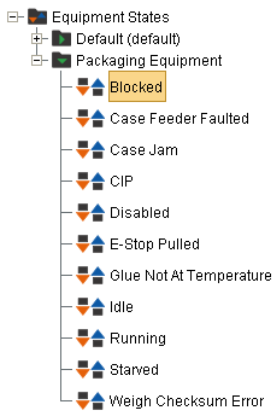
- IDLE
- STARVED
- RUNNING
- BLOCKED
- DISABLED
- DOWN PLANNED
- DOWN UNPLANNED
New equipment state classes can be created using the MES Equipment Manager Vision and MES Equipment Manager | Perspective components.
MES Equipment State Object Creation
No scripting functions or components use this object directly.
Equipment states can also be created through scripting.
Create via Scripting
- Load the Equipment State Class object.
- Create a new Equipment State object.
- Assign the Equipment State as the child of the Equipment State Class.
- Give the Equipment State a name and setting other required properties like EquipmentStateCode, EquipmentStateType, etc.
- Save the Equipment State object and Equipment State Class object.
Python |
stateCls = system.mes.loadMESObject('YourStateClass','EquipmentStateClass') #insert the name of your State Class here name = 'YourStateName' code = 12 #this is the state code provided by your PLC state = system.mes.createMESObject('EquipmentState') stateCls.addChild(state) state.setPropertyValue('Name', name) state.setPropertyValue('EquipmentStateCode', code) state.setPropertyValue('EquipmentStateType', 'Unplanned Downtime') #valid values for EquipmentStateType: "Running", "Idle", "Blocked", "Starved", "Planned Downtime", "Unplanned Downtime", "Disabled" state.setPropertyValue('EquipmentStateOverride', 'Optional') state.setPropertyValue('EquipmentStateOverrideScope', 'Detected Equipment State') stateObjList = system.mes.object.list.createList() stateObjList.add(stateCls) stateObjList.add(state) system.mes.saveMESObjects(stateObjList) |
Object Properties
Property values can be accessed and changed for an object by using the getPropertyValue() and setPropertyValue() method.
See details at Configuring Equipment States.
| MESEquipmentState Object Properties: | Options and Behavior: |
|---|---|
| EquipmentEnableMeantimeMetrics | Boolean When enabled, this state is included in the calculation of Mean Time Between Failure (MTBF). |
| EquipmentStateCode | int Enter in the integer value for this equipment state. This will generally align with the status code value from the PLC. Note: Do not set state code to zero as it is used internally. |
| EquipmentStateType | Valid equipment state types are...
|
| EquipmentStateShortStopThreshold | Enter in a time value in seconds for how long a state must persist for before it considered to be in this. The Short Stop Threshold is not used for states of state type RUNNING. |
| EquipmentStateOverride | The Override property defines if it is possible for a operator to override the equipment state through the Downtime Table Editor component. Valid options are:
|
| EquipmentStateOverrideScope | The scope setting is used by the Override setting to provide a set of operator selectable equipment states. Valid Options are:
|
| overrideCurrentLineDowntime | Boolean Indicates if the current state should override line downtime should it become active on a cell in a Line Downtime, Key Reason detection, scenario. False - would not override current line downtime, consider this as respecting a latched downtime reason. |
MESEquipmentState Object Functions
- Default State Types
- MES Equipment State Object Creation
- Create via Scripting
- Object Properties
- getStateCode()
- getStateOverrideScope()
- getStateOverrideSetting()
- getStateShortStopThreshold()
- getStateType()
- getStateTypeName()
- isOverrideCurrentLineDowntime()
- setOverrideCurrentLineDowntime()
getStateCode()
Returns the code (an integer) that represents this equipment state.
Syntax
getStateCode()
Parameters
None
Returns
Integer - The integer code that is associated with this equipment state.
getStateOverrideScope()
getStateOverrideScope()
getStateOverrideSetting()
getStateShortStopThreshold()
Returns the duration (in seconds) that a state will be considered as a short stop (if less than). If state duration is longer, then it will be considered a downtime event, or planned downtime event or other.
Syntax
getStateShortStopThreshold()
Parameters
None
Returns
Integer threshold - The duration (in seconds) that a state will be considered as a short stop.
getStateType()
getStateTypeName()
isOverrideCurrentLineDowntime()
Parameters
setOverrideCurrentLineDowntime()
MESEquipmentState Events
Inherits:
| Event | Behavior |
|---|---|
| New | The event is fired when a new instance of a Equipment State object is created. If no script is entered, then the default handler will be executed. To execute the default handler from within the script entered here, add a script line: event.runDefaultHandler() |
Sepasoft MES Module Suite