Sepasoft MES Module Suite
Operations Definition Settings
Operations definition can be configured using the MES Object Editor component. The various fields in the operations definition editor is described here.
Core Properties
| Property | Data Type | Description |
|---|---|---|
| Name | String | Name of the operations definition to be added |
| Description | String | Description of the operations definition |
| Production Visible | boolean | Show operation in selectors property |
| Enable Update Event | boolean | Enable update event property |
| Update Event Interval (seconds) | Int4 | Interval in seconds to run the update event while the operation is active |
| Track Progress By | String | Track progress by property |
Custom Properties
Custom properties can be added here for any meta data you want to store during execution of this operations definition. Data stored here can be accessed through scripting for analysis. Custom properties are optional. Refer to setCustomPropertyValues for more details on using scripting functions to set custom properties.
| Property | Data Type | Description |
|---|---|---|
| Name | String | The name of custom property |
| Value | String | The value of custom property |
| Units | String | The unit description of the custom property value |
| Data Type | String | The data type of the custom property. Valid options are Int1, Int2, Int4, Int8, Float4, Float8, Boolean, String, DateTime, Int1Array, Int2Array, Int4array, Int8Array, Float4Array, Float8array, BooleanArray, StringArray, DateTimeArray |
| Description | String | Description of custom property |
| Production Visible | boolean | If this property is set to True, then the custom property will be visible at the time of production |
| Required | boolean | This box is unchecked by default. If this setting is checked, then this property is a required property and if it is unchecked, this is an optional property |
| Custom Properties | To add a custom property of a custom property, select this row and click add button on tool bar |
Trigger Operation Begin
| Property | Data Type | Description |
|---|---|---|
| Name | String | The name of the custom property that can be used to reference this Trigger Operation Begin event in script |
| Mode | String | Begin trigger mode property. Options are:
|
| Auto | boolean | Begin trigger auto execute property |
| Preceding Operation Reference | String | Preceding operation reference property |
Auto Start Operation Based on Schedule

|
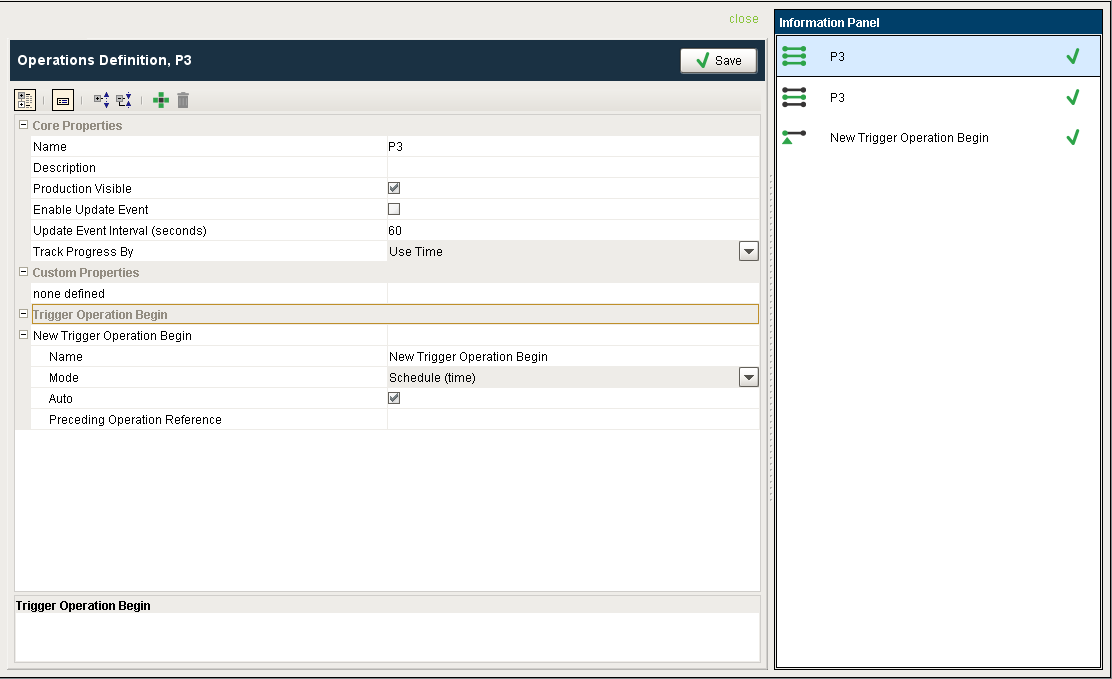
If you want a given operation to begin automatically based on the schedule, ensure a Trigger Operation Begin is configured with Auto set to True and the Mode set to "Schedule (time)" as seen below. Then, the schedule entry will automatically start the appropriate response objects based on the schedule. Note: If an Operations Definition is configured so that it can begin automatically when triggered from a schedule (DefaultBeginTrigger = Auto), make sure that the associated Operations Segment for changeover also has its Auto checkbox enabled (it will not be enabled by default).
|
Sepasoft MES Module Suite