Sepasoft MES Module Suite
Request Segment
This object holds information about equipment, material and personnel for the schedule operations segment.
Derived from the
AbstractMESObject inheriting all the exposed properties, methods and events for that object.
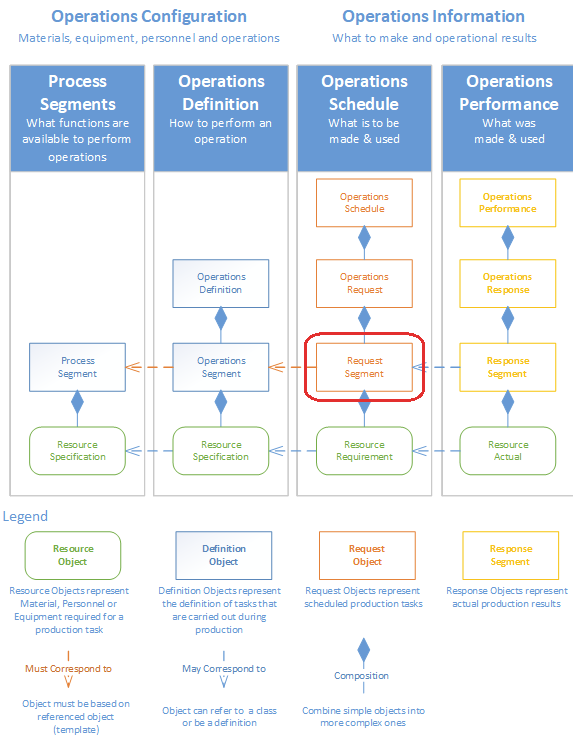
Object Creation
The following scripting functions can also be used to create this type of object.
Object Use
The following scripting functions can also be used to return this type of object.
Object Properties
These properties are accessible through the linked component and with the provided object functions, but not directly as obj.properties. Property values can be accessed and changed for an object by using the getPropertyValue() and setPropertyValue() method.
|
Operation.Request.Ref.UUID
|
OperationsRequestRefUUID
|
Read/Write
|
This setting is automatically set and should not be changed. It refers to the UUID of the Operations Request.
|
|
Begin Date Time
|
BeginDateTime
|
Read/Write
|
The date and time the operation started. This setting is set when the operation is started, and it will automatically be set to the date and time of the Ignition server.
|
|
End Date Time
|
EndDateTime
|
Read/Write
|
The date and time the operation ended. This setting is set when the operation is ended, and it will automatically be set to the date and time of the Ignition server.
|
|
Operation Segment Ref Type
|
OperationSegmentRefType
|
Read/Write
|
This setting is automatically set and should not be changed. It will either be set to Operations Segment or Request Segment depending on how the operation was started. If the operation was scheduled prior to being run, then it will equal Request Segment, otherwise it will equal Operations Segment.
|
|
Operation Segment Ref UUID
|
OperationSegmentRefUUID
|
Read/Write
|
This setting is automatically set and should not be changed. It refers to the UUID of the Operations Segment or Request Segment, depending on how the operation was started. If the operation was scheduled prior to being run, then it will equal the UUID of the Request Segment it is based on, otherwise it will equal the UUID of the Operations Segment it is based on.
|
|
Segment Execute Enabled
|
ExecuteEnabled
|
Read/Write
|
When this setting is set to true, the Segments associated with this Operations Request will be executed.
|
|
End.Operation.When.Complete
|
EndOperationWhenComplete
|
Read/Write
|
This setting will end the operation automatically, after completion.
|
Complex Properties
A request segment uses complex property objects to hold information about the resources that have been assigned to the scheduled operation. These complex properties are automatically added to the request segment when an operation is scheduled using the MES Schedule View component or can be added through scripting with the AbstractMESObject.createComplexProperty() function.
|
Response Material Property
|
Any material lots that were consumed or created during the operation can be accessed through this object..
|
|
Response Equipment Property
|
The equipment that was used during the operation can be accessed through this object..
|
|
Response Supplemental Equipment Property
|
Mobile equipment or die sets etc. used during this operation can be accessed through this object.
|
|
Response Personnel Property
|
Personnel associated with this operation can be accessed through this object.
|
|
Response Production Settings Property
|
Actual Production settings containing rate information used by the OEE module to calculate operational performance can be accessed through this object.
|
|
Response Trigger Segment Begin Property
|
This property holds information about what triggered the start of the operation.
|
|
Response Trigger Segment End Property
|
This property holds information about what caused the operation to end.
|
Object Functions
This object provides the following functions:
- getAvailableEquipmentOptions()
- getAvailableLotEquipmentOptions(baseName)
- getAvailableMaterialOptions(baseName)
- getAvailablePersonnelOptions(baseName)
- getAvailableSupplementalEquipmentOptions(baseName)
- getEquipment()
- getEquipmentProperty()
- getProductionSettingsProperty(equipmentPath)
- getResponseSegment()
- setEquipmentLink(equipmentLink)
- setMaterial(baseName, materialName, equipmentPath)
- setMaterial(baseName, materialName, equipmentPath, quantity)
- setMaterial(baseName, materialName, equipmentPath, quantity, customProperties)
- setMaterial(baseName, materialName, equipmentPath, manualLotNumber, quantity)
- setMaterial(baseName, materialName, equipmentPath, manualLotNumber, quantity, customProperties)
- setPersonnel(baseName, personName)
- setPersonnel(baseName, personName, customProperties)
- setSupplementalEquipment(baseName, equipmentName)
- setSupplementalEquipment(baseName, equipmentName, customProperties)
getAvailableEquipmentOptions()
Get a list of the available equipment options for the specified request segment.
getAvailableEquipmentOptions()
None
MESList<MESObjectLink> A list of MES Object Link objects holding the options that are appropriate for the segment. The list is returned as a MES List object that is a collection holding MES object links that represent the options.
All
getAvailableLotEquipmentOptions(baseName)
Get a list of the available lot equipment options for the specified request segment.
getAvailableLotEquipmentOptions(baseName)
String baseName - The base name for the complex property associated with this segment. Complex properties that use extended naming have an associated base name and a number following it. This is used with Lot Reference Property that the Request Segment uses. Each time a lot reference is created it is named the base name with an extension added to it.
MESList<MESObjectLink> A list of MES Object Link objects holding the options that are appropriate for the segment. The list is returned as a MES List object that is a collection holding MES object links that represent the options.
All
getAvailableMaterialOptions(baseName)
Get a list of the available material options for the specified request segment.
getAvailableMaterialOptions(baseName)
String baseName - The base name for the complex property associated with this segment. Complex properties that use extended naming have an associated base name and a number following it. This is used with Lot Reference Property that the Request Segment uses. Each time a lot reference is created it is named the base name with an extension added to it.
MESList<MESObjectLink> A list of MES Object Link objects holding the options that are appropriate for the segment. The list is returned as a MES List object that is a collection holding MES object links that represent the options.
All
getAvailablePersonnelOptions(baseName)
Get a list of the available personnel options for the specified request segment.
getAvailablePersonnelOptions(baseName)
String baseName - The base name for the complex property associated with this segment. Complex properties that use extended naming have an associated base name and a number following it. This is used with Lot Reference Property that the Request Segment uses. Each time a lot reference is created it is named the base name with an extension added to it.
MESList<MESObjectLink> A list of MES Object Link objects holding the options that are appropriate for the segment. The list is returned as a MES List object that is a collection holding MES object links that represent the options.
All
getAvailableSupplementalEquipmentOptions(baseName)
Get a list of the available supplemental equipment options for the specified request segment.
getAvailableSupplementalEquipmentOptions(baseName)
String baseName - The base name for the complex property associated with this segment. Complex properties that use extended naming have an associated base name and a number following it. This is used with Lot Reference Property that the Request Segment uses. Each time a lot reference is created it is named the base name with an extension added to it.
MESList<MESObjectLink> A list of MES Object Link objects holding the options that are appropriate for the segment. The list is returned as a MES List object that is a collection holding MES object links that represent the options.
All
getEquipment()
Return the equipment MES object associated with the segment. This will be the same equipment that is associated with the operation that the segment is running under.
getEquipmentLink()
Return the link to the equipment MES object associated with the segment. This will be the same equipment that is associated with the operation that the segment is running under.
getEquipmentLink()
None
The MES Object Link representing the equipment.
All
getEquipmentProperty()
Return the complex property of the equipment MES object associated with the segment. This will be the same equipment that is associated with the operation that the segment is running under.
getEquipmentProperty()
None
The MESEquipmentProperty representing the equipment.
All
getProductionSettingsProperty(equipmentPath)
Returns the production settings property.
getProductionSettingsProperty(equipmentPath)
String equipmentPath - The path of equipment to return the production settings for.
MESResponseProductionSettingsProperty productionSettings - The production settings corresponding to the specified equipment path.
All
|
oper = system.mes.loadMESObject('Basil-Enterprise:Site:Area:Line 4', 'OperationsDefinition')

objList = system.mes.createSchedule(oper)

for obj in objList:
    if obj.getMESObjectType().getName() == 'RequestSegment':
        prop = obj.getProductionSettingsProperty(eqPath)
        print prop.getOEERate()
|
getResponseSegment()
Gets the Response Segment related to this Request Segment.
getResponseSegment()
None
MESObjectLink rspSegLink - The MESObjectLink that references an MESResponseSegment object.
All
setEquipmentLink(equipmentLink)
Set the equipment that the segment is associated with by the link to the equipment.
setEquipmentLink(equipmentLink)
MES Object Link equipmentLink - A MES Object Link object containing details of the equipment to associate with the segment.
Nothing
All
setMaterial(baseName, materialName, equipmentPath)
This script function is used to set the material resources for a segment by material and location. There are different versions depending on if a lot is being referenced, a new lot is being created, etc. It can be used before or after the begin script function is called on the segment. If they are used for an active segment, then they will update the material resources information. This is common when changing to a different lot of material or other material related information during a production run.
setMaterial(baseName, materialName, equipmentPath)
String baseName - The base name for the complex property associated with this segment. Complex properties that use extended naming have an associated base name and a number following it. This is used with Lot Reference Property that the Request Segment uses. Each time a lot reference is created it is named the base name with an extension added to it.
String materialName - The material name that must match an existing MESMaterialDef object.
String equipmentPath - The equipment path that must match the path to equipment defined in the production model.
Nothing
All
setMaterial(baseName, materialName, equipmentPath, quantity)
This script function is used to set the material resources for a segment. There are different versions depending on if a lot is being referenced, a new lot is being created, etc. It can be used before or after the begin script function is called on the segment. If they are used for an active segment, then they will update the material resources information. This is common when changing to a different lot of material or other material related information during a production run.
setMaterial(baseName, materialName, equipmentPath, quantity)
String baseName - The base name for the complex property associated with this segment. Complex properties that use extended naming have an associated base name and a number following it. This is used with Lot Reference Property that the Request Segment uses. Each time a lot reference is created it is named the base name with an extension added to it.
String materialName - The material name that must match an existing MESMaterialDef object.
String equipmentPath - The equipment path that must match the path to equipment defined in the production model.
Double quantity - The quantity of material.
Nothing
All
setMaterial(baseName, materialName, equipmentPath, quantity, customProperties)
This script function is used to set the material resources for a segment. There are different versions depending on if a lot is being referenced, a new lot is being created, etc. It can be used before or after the begin script function is called on the segment. If they are used for an active segment, then they will update the material resources information. This is common when changing to a different lot of material or other material related information during a production run.
setMaterial(baseName, materialName, equipmentPath, quantity, customProperties)
String baseName - The base name for the complex property associated with this segment. Complex properties that use extended naming have an associated base name and a number following it. This is used with Lot Reference Property that the Request Segment uses. Each time a lot reference is created it is named the base name with an extension added to it.
String materialName - The material name that must match an existing MESMaterialDef object.
String equipmentPath - The equipment path that must match the path to equipment defined in the production model.
Double quantity - The quantity of material.
PyDictionary customProperties - A PyDictionary containing either name value pairs or complete custom property definitions. See Custom Properties for more information.
Nothing
All
setMaterial(baseName, materialName, equipmentPath, manualLotNumber, quantity)
This version of the setMaterial script function is used for setting the material name and location equipment to use the material from, or place the material at for a material reference belonging to a segment. For cases when a material lot does already exist, this script function is used and allows for naming the new lot and updating the quantity at the same time. Instead of automatically generating a new lot number, the system with use the manual lot number provided in the manualLotNumber parameter.
The material name must match the name of an existing MESMaterialDef object which corresponds to the ISA-95 Material Definition object. The equipment path must match a valid line, line cell, line cell group or storage unit defined in the production model.
setMaterial(baseName, materialName, equipmentPath, manualLotNumber, quantity)
String baseName - The base name for the complex property associated with this segment. Complex properties that use extended naming have an associated base name and a number following it. This is used with Lot Reference Property that the Request Segment uses. Each time a lot reference is created it is named the base name with an extension added to it.
String materialName - The material name that must match an existing MESMaterialDef object.
String equipmentPath - The equipment path that must match the path to equipment defined in the production model.
String manualLotNumber - The lot number to name to the new MESMaterialLot object
Double quantity - The quantity of material.
Nothing
All
setMaterial(baseName, materialName, equipmentPath, manualLotNumber, quantity, customProperties)
This version of the setMaterial script function is used for setting the material name and location equipment to use the material from, or place the material at for a material reference belonging to a segment. For cases when a material lot does already exist, this script function is used and allows for naming the new lot and updating the quantity at the same time. Instead of automatically generating a new lot number, the system with use the manual lot number provided in the manualLotNumber parameter.
The material name must match the name of an existing MESMaterialDef object which corresponds to the ISA-95 Material Definition object. The equipment path must match a valid line, line cell, line cell group or storage unit defined in the production model.
setMaterial(baseName, materialName, equipmentPath, manualLotNumber, quantity, customProperties)
String baseName - The base name for the complex property associated with this segment. Complex properties that use extended naming have an associated base name and a number following it. This is used with Lot Reference Property that the Request Segment uses. Each time a lot reference is created it is named the base name with an extension added to it.
String materialName - The material name that must match an existing MESMaterialDef object.
String equipmentPath - The equipment path that must match the path to equipment defined in the production model.
String manualLotNumber - The lot number to name to the new MESMaterialLot object
Double quantity - The quantity of material.
PyDictionary customProperties - A PyDictionary containing either name value pairs or complete custom property definitions. See Custom Properties for more information.
Nothing
All
setPersonnel(baseName, personName)
This script function is used to set the personnel resources for a segment. It can be used before or after begin script function is called on the segment. If they are used for an active segment, then they will update the personnel resources information. This is common when changing to different personnel during a production run.
setPersonnel(baseName, personName)
String baseName - The base name for the complex property associated with this segment. Complex properties that use extended naming have an associated base name and a number following it. This is used with Lot Reference Property that the Request Segment uses. Each time a lot reference is created it is named the base name with an extension added to it.
String personName - The name of the person. The name of the person is derived from the last and first name from the Ignition user list.
Nothing
All
setPersonnel(baseName, personName, customProperties)
This script function is used to set the personnel resources for a segment. It can be used before or after begin script function is called on the segment. If they are used for an active segment, then they will update the personnel resources information. This is common when changing to different personnel during a production run.
setPersonnel(baseName, personName, customProperties)
String baseName - The base name for the complex property associated with this segment. Complex properties that use extended naming have an associated base name and a number following it. This is used with Lot Reference Property that the Request Segment uses. Each time a lot reference is created it is named the base name with an extension added to it.
String personName - The name of the person. The name of the person is derived from the last and first name from the Ignition user list.
PyDictionary customProperties - A PyDictionary containing either name value pairs or complete custom property definitions. See Custom Properties for more information.
Nothing
All
setSupplementalEquipment(baseName, equipmentName)
This script function is used to set the supplemental equipment resources for a segment.
setSupplementalEquipment(baseName, equipmentName)
String baseName - The base name for the complex property associated with this segment. Complex properties that use extended naming have an associated base name and a number following it. This is used with Lot Reference Property that the Request Segment uses. Each time a lot reference is created it is named the base name with an extension added to it.
String equipmentName - The name of the supplemental equipment.
Nothing
All
setSupplementalEquipment(baseName, equipmentName, customProperties)
Set the supplemental equipment that the segment is associated with.
setSupplementalEquipment(baseName, equipmentName, customProperties)
String baseName - The base name for the complex property associated with this segment. Complex properties that use extended naming have an associated base name and a number following it. This is used with Lot Reference Property that the Request Segment uses. Each time a lot reference is created it is named the base name with an extension added to it.
String equipmentName - The name of the supplemental equipment.
PyDictionary customProperties - A PyDictionary containing either name value pairs or complete custom property definitions. See Custom Properties for more information.
Nothing
All
Object Events
Objects have events associated with them that allow for custom scripts to be added whenever the event occurs.
|
Schedule
|
The Schedule Request Segment event is fired when a Request Segment is begin scheduled. This script must determine the begin date time and end date time of the request segment.
If no script is entered, then the default handler will be executed. To execute the default handler from within the script entered here, add a script line:
event.runDefaultHandler()
|
Sepasoft MES Module Suite