Sepasoft MES Module Suite
Material Resource Parameters
Material_In Sub-Parameter
Provided in the Batch Procedure framework to Track and Trace materials through a workflow.
Material_In resource parameter defines:
- material by material_name
- source by lot_no
- procedure (batch recipe) reference by Phase > Unit Class to Unit Procedure assignment.
Add parameter to an element within the batch procedure framework and set the Data Type to Material_In.
You can add material parameters to any phase type within Batch Procedure.

Material_In Sub-Parameters
Sub-parameter reference in scripting:
Python |
mat_in.Lot_No |
Parameter Properties - See Properties for Sub-Parameters.
Provided from:

|
3.81.8 RC 1 and 3.81.8 Stable Release. |
|
Sub-Parameter Name
|
Description | Recording Type | Value Source Default | Tag Type | Calculation |
Data
Type |
Required by scripting functions: |
|---|---|---|---|---|---|---|---|
|
Active_Allocation |
Informational sub-parameter that is used when there are multiple Material_In parameters with the same Alternate_Group. |
All to Object Default -editable |
Neither Default -editable |
Memory Default -editable |
blank Default -editable |
String Default -not editable |
|
|
Actual_Quantity |
The actual amount consumed from a lot. The system populates this value. Included in history for analysis. |
All to Object and History | Execution | Memory |
|
Double | |
|
Alternate_Group |
Optional Can add multiple Material_In parameters and make them all the same Alternate Group. Create an ENUM and make the default values of the enum “alternate group 1”, “alternate group 2”, etc. |
Changes Not Saved | Recipe | Memory |
|
String | |
|
Alternate_Priority |
Optional based on using alternate materials. Order in which to check the groups for inventory evaluation. Check 1 first, 2 second, etc. |
Changes Not Saved | Recipe | Memory |
|
Integer | |
|
Auto_Create_Lot |
Boolean T/F True - Create material lot under all circumstances. If True, values must be provided for:
|
Changes Not Saved | Recipe | Memory |
|
Boolean | |
|
Auto_Select_Lot |
Boolean T/F
|
Changes Not Saved | Recipe | Memory |
|
Boolean | |
|
Bypass_Quantity_Check bypassQuantityCheck |
Used in systems where inventory checks are not relevant, and does not require rigorous accounting of material quantities. |
Changes Not Saved | Recipe | Memory |
|
Boolean | |
|
Enable |
Used in conjunction with Alternate set. | Changes Not Saved in database | Recipe | Memory |
|
Boolean | |
|
Lot_Equipment |
Can be path, class, supplemental equipment, or manifest to limit the lots. | All to Object and History | Recipe and Execution | Memory |
|
String | |
|
Lot_Equipment_Class |
Equipment can be filtered by Equipment Class. | All to Object and History | Recipe | Memory |
|
String | |
|
Lot_Manifest |
Used with Alternate materials. | All to Object and History | Recipe and Execution | Memory |
|
String | |
|
Lot_Manifest_Class |
Filter by Manifest Class for a grouping of manifests to use. | All to Object and History | Recipe | Memory |
|
String | |
|
Lot_No |
Must be provided when setting Auto_Create_Lot to True; Otherwise this can be provided during runtime. | All to Object and History | Execution | Memory |
|
String | |
|
Lot_Status |
The lots that can be selected are limited to have this lot status. Use Lot_Status ENUM default. If left blank, only Lot_Status = Complete are available. To include all, enter a wildcard '*'. |
All to Object and History | Recipe and Execution | Memory |
|
Enum (Lot_Status) | |
|
Material_Class |
Optional based on using material classes. The lots that can be selected are limited to be a material of this class of material. If left blank, system returns all lots with statue=complete. Use wildcard '*' to return all. |
All to Object and History | Recipe | Memory |
|
String | |
|
Material_Name materialName |
The lots that can be selected are limited to be of this material. Make part of history for analysis. If a Material_Class is provided, this is not required. |
All to Object and History | Recipe and Execution | Memory |
|
String | |
|
Material_UOM |
Optional - Unit of Measure (UOM) | All to Object and History | Recipe | Memory |
|
Enum (Material_UOM) | |
|
Message |
Leave this blank. This is for system messages. | All to History | Neither | Memory |
|
String | |
|
Preallocate |
Optional based on using a Pre-allocate phase. If true, then the inventory is allocated when the Unit Procedure starts. |
Changes Not Saved | Recipe | Memory |
|
Boolean | |
|
Record_Trace |
Triggers the Trace User ID | Changes Not Saved | Execution | Memory |
|
Boolean | |
|
Target_Quantity |
The target amount to consume from a lot. Included in history for analysis. | All to Object and History | Recipe and Execution | Memory |
|
Double | |
|
Trace_Count
|
Added in SP version: 3.81.9 SP2 Trace count will increment by 1 for material in and material out each time a new lot is created/consumed
Trace count will increment by 1 for supplemental equipment when new equipment is chosen
Trace count will increment by 1 for material in, material out, and supplemental equipment each time a phase is re-ran
For example: looping back will increment trace_count by 1, even if no quantities or other parameters changed
|
|
Recipe As of 3.81.10 R2, the default is 'Neither'. |
Memory
|
|
String
|
|
|
Trace_User_ID |
This ID is used by the system to trace material through a process and to update values. Updated each time Record_Trace is triggered. Exposed in Tag Browser |
All to History | Recipe | Memory |
|
String |
Provided from:
|
|
3.81.8 RC 1 and 3.81.8 Stable Release. |
Material_Out Sub-Parameter
Add a Material_Out parameter to an element within the batch procedure framework and set the Data Type to Material_Out.
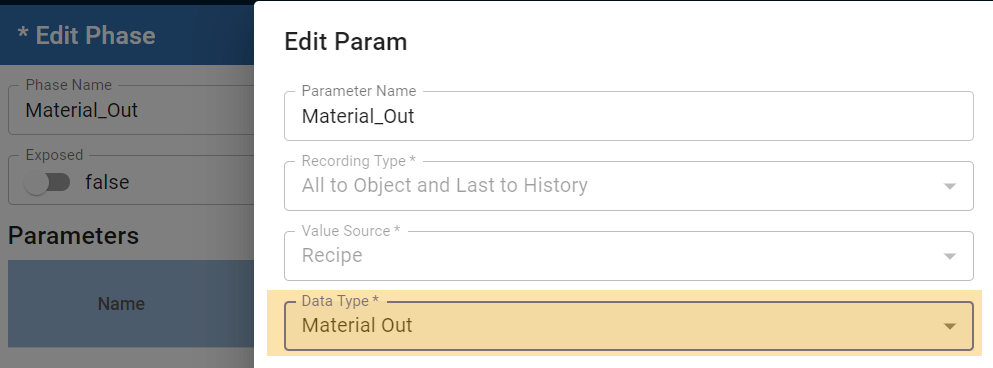
This is a python dictionary that holds resource data for materials.
Related:
Sub-parameter property reference:
Code |
mat_out.Lot_No |
Provided from:
|
|
3.81.8 RC 1 and 3.81.8 Stable Release. |
For more description about each sub-parameter property, see Properties for Sub-Parameters.
Name | Description | Sort by type | Default Value | Default Value Source Type | Default Tag Type | Data Type | Default Recording Type |
|---|---|---|---|---|---|---|---|
Actual_Quantity | The actual amount of a material that was consumed. | Quantity | 0.0 | Execution | Memory | Double | All to Object and History |
Auto_Create_Manifest | Not required | Manifest | false | Recipe | Memory | Boolean | |
Auto_Create_Supplemental | Not required | Supplemental Equipment | false | Recipe | Memory | Boolean | |
Lot_Equipment | Can be path, class, supplemental equipment, or manifest to limit the lots. Required | Equipment | no default | Recipe and Execution | Memory | String | All to Object and History |
Lot_Equipment_Class | Not required | Equipment | no default | Recipe and Execution | Memory | String | All to Object and History |
Lot_Manifest | Not required | Manifest | no default | Recipe and Execution | Memory | String | All to Object and History |
Lot_Manifest_Class | Not required | Manifest | no default | Recipe and Execution | Memory | String | All to Object and History |
Lot_No | Required | Material Lot | no default | Execution | Memory | String | All to Object and History |
Lot_Status | The lots that can be selected are limited to have this lot status. Use Lot_Status ENUM default. Required | Material Lot | Taken from Mat_In | Recipe and Execution | Memory | Enum (Lot_Status) | All to Object and History |
Material_Class | Defines the set of Materials that can be used. Not required | Material Lot | Recipe | Memory | String | All to Object and History | |
Material_Name | Name of the material created in Material Manager or scripting. Required | Material Lot | Recipe and Execution | Memory | String | All to Object and History | |
Material_UOM | Unit of Measure of the Material. Not required | Material Lot | Recipe | Memory | Enum (Material_UOM) | All to Object and History | |
Message | Displays system messages | System message | Neither | Memory | String | All to History | |
Record_Trace | Triggers Trace_User_ID | Trace | false | Execution | Memory | Boolean | Changes Not Saved |
Trace_User_ID | This ID is used by the system to trace material through a process and to update values. Updated each time Record_Trace is triggered. Exposed in Tag Browser | Trace | Recipe | Memory | String | All to History |
Sepasoft MES Module Suite