Sepasoft MES Module Suite
Sample Definition Settings for Process Capability
In the Sample Definition Manager, add or edit a sample definition. To learn about how to do this, see Sample Definitions.
Below is an example of how the settings could be configured for this type of chart.
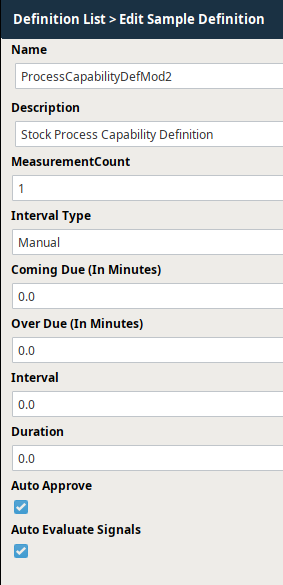
Sample Definition Settings for Process Capability | Attributes

Sample Definition Settings for Process Capability | Rules
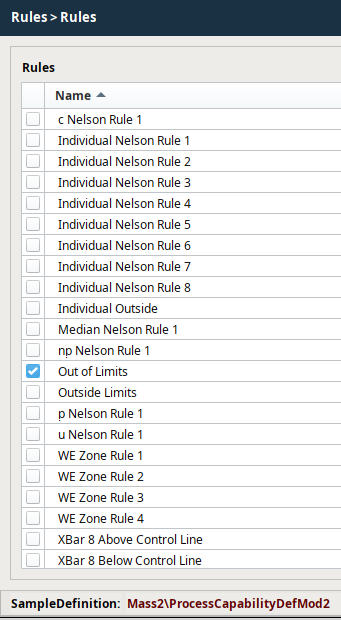
Pareto Settings
| Name | Information |
|---|---|
Sample Definition Settings for Process Capability |Control Limits
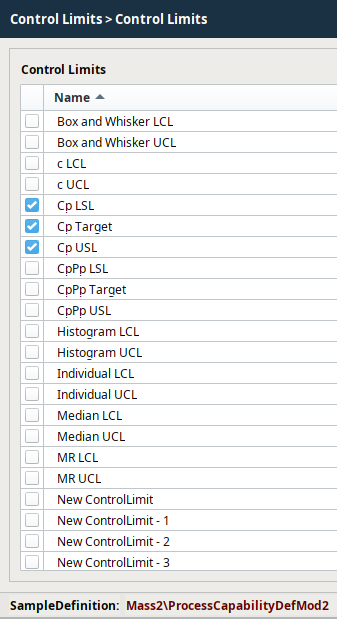
Important Control Limits to Add for Box and Whisker
| Name | Information |
|---|---|
After all the desired settings have been defined, select Save to commit all the changes or Cancel to undo any changes that have been made. After a Sample Definition has been created, samples based on them may begin to appear or can be manually added depending on the Interval setting.
Sepasoft MES Module Suite