Sepasoft MES Module Suite
Scripting Equipment Items and Complex Properties
The Sepasoft Platform 3.0 software adds the ability to create all objects within the Production Model via Python scripting, such as Sites, Areas, Lines, Cell Groups, Cells, Storage Zones, Storage Units and Locations, as well as Complex Properties such as MES Counters, Live Analyses and Additional Factors.
Adding an Equipment Item
The Enterprise-level equipment item is provided by default (once the Sepasoft Production Module is loaded). It can be renamed, but cannot be deleted. All other equipment items can be created via script, using the system.mes.createMESObject() function.
Example: Add a new Line to Area51:
Python |
[Code] def createSite(name, parent): return createObject('Site', name, parent) def createArea(name, parent): return createObject('Area', name, parent) def createLine(name, parent): return createObject('Line', name, parent) def createLineCell(name, parent): return createObject('LineCell', name, parent) def createLineCellGroup(name, parent): return createObject('LineCellGroup', name, parent) def createStorageZone(name, parent): return createObject('StorageZone', name, parent) def createStorageUnit(name, parent): return createObject('StorageUnit', name, parent) def createLocation(name, parent): return createObject('Location', name, parent) def addAdditionalFactor(obj, name, tagPath): prop = obj.createComplexProperty('AdditionalFactor', name) prop.setTagPath(tagPath) return prop def addLiveAnalysis(obj, name): prop = obj.createComplexProperty('LiveAnalysis', name) return prop; def addCounter(obj, name, tagPath, counterKind = ""): prop = obj.createComplexProperty('Counter', name) prop.setTagPath(tagPath + counterKind) if (counterKind != ""): prop.setCountKind(counterKind) prop.setCountMode("Positive Change") return prop def addTagCollector(obj, type): prop = obj.createComplexProperty('TagCollector', type) prop.setTagCollectorType(type) return prop def createObject(type, name, parent): obj = system.mes.createMESObject(type) obj.getCoreProperties().get('Name').setValue(name) obj.addParent(parent) return obj; def visitChildren(parent): for child in parent.getChildCollection().values(): mesObject = child.getMESObject() print mesObject visitChildren(mesObject) TAG_ROOT = '[default]{Equipment Path}/' TAG_NAME = TAG_ROOT + 'SampleTag' EQUIPMENT_MODE = 'bb4de399-ec60-4df1-9e39-0a6bb208fd24' def createObjects(n): list = system.mes.object.list.createList() ent = system.mes.getMESObjectLinkByEquipmentPath('Enterprise').getMESObject() print ent for s in range(n): aSite = createSite('Site ' + `s`, ent) aSite.setEnabled(True) list.add(aSite) for a in range(n): anArea = createArea('Area ' + `a`, aSite) anArea.setEnabled(True) list.add(anArea) for l in range(n): aLine = createLine('Line ' + `l`, anArea) addAdditionalFactor(aLine, 'A Factor', TAG_NAME) addCounter(aLine, 'General Counter', TAG_ROOT, 'General') addCounter(aLine, 'Infeed Counter', TAG_ROOT, 'Infeed') addCounter(aLine, 'Outfeed Counter', TAG_ROOT, 'Outfeed') addCounter(aLine, 'Reject Counter', TAG_ROOT, 'Reject') addLiveAnalysis(aLine, 'A Live Analysis') aLine.setEnabled(True) list.add(aLine) for lc in range(n): aLineCell = createLineCell('Line Cell ' + `lc`, aLine) addAdditionalFactor(aLineCell, 'A Factor', TAG_NAME) addCounter(aLineCell, 'A Counter', TAG_NAME) addLiveAnalysis(aLineCell, 'A Live Analysis') addTagCollector(aLineCell, 'Equipment Mode') props = aLineCell.getCoreProperties() list.add(aLineCell) # for lcg in range(n): # aLineCellGroup = createLineCellGroup('Line Cell Group ' + `lcg`, aLine) # addAdditionalFactor(aLineCellGroup, 'A Factor', TAG_NAME) # addCounter(aLineCellGroup, 'A Counter', TAG_NAME) # addLiveAnalysis(aLineCellGroup, 'A Live Analysis') # addTagCollector(aLineCellGroup, 'Equipment Mode') # props = aLineCellGroup.getCoreProperties() # props.get('EquipmentModeClassUUID').setValue(EQUIPMENT_MODE) # aLineCellGroup.setEnabled(True) # list.add(aLineCellGroup) # for lc in range(n): # aLineCell = createLineCell('Line Cell ' + `lc`, aLineCellGroup) # addAdditionalFactor(aLineCell, 'A Factor', TAG_NAME) # addCounter(aLineCell, 'A Counter', TAG_NAME) # addLiveAnalysis(aLineCell, 'A Live Analysis') # addTagCollector(aLineCell, 'Equipment Mode') # props = aLineCell.getCoreProperties() # props.get('EquipmentModeClassUUID').setValue(EQUIPMENT_MODE) # aLineCell.setEnabled(True) # list.add(aLineCell) # for llo in range(n): # aLocation = createLocation('Location ' + `llo`, aLine) # aLocation.setEnabled(True) # list.add(aLocation) # for lo in range(n): # aLocation = createLocation('Location ' + `lo`, anArea) # aLocation.setEnabled(True) # list.add(aLocation) # for sz in range(n): # aStorageZone = createStorageZone('Storage Zone ' + `sz`, anArea) # aStorageZone.setEnabled(True) # list.add(aStorageZone) # for su in range(n): # aStorageUnit = createStorageUnit('Storage Unit ' + `su`, aStorageZone) # aStorageUnit.setEnabled(True) # list.add(aStorageUnit) print list visitChildren(ent) system.mes.saveMESObjects(list) |

|
Running a script to create an equipment item a second time will throw an error since the item already exists. |
References
- system.mes.createMESObject
- .setName, .addParent: AbstractMESObject
- MES Custom Property
- system.mes.loadMESObject
- MES Object Type Name
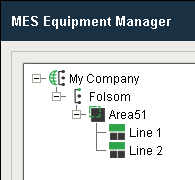
Before script
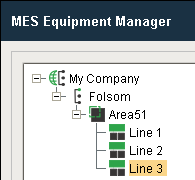
After script
Adding Complex Properties
The following complex properties can be created for an existing equipment item using the createComplexProperty() function:
References
- Object Functions
- system.mes.loadMESObject
Creating an MES Counter
To add an MES Counter and assign properties, load the equipment item, create the counter as a complex property, assign the properties, then save the equipment item.
Example: Creating an Infeed counter named Parts In - Cell 1A of type Positive Change:
Python |
#Create and name a new MES Counter for Cell 1A called Parts In - Cell 1A eqPath = 'My Company\Folsom\Area51\Line 1\Cell 1A' cell = system.mes.loadMESObjectByEquipmentPath(eqPath) counter_obj = cell.createComplexProperty('Counter', 'Parts In - Cell 1A') #Set counter Tag Path property tagPath = 'My Company/Folsom/Area51/Line 1/Cell 1A/Infeed - Cell 1A' counter_obj.setTagPath(tagPath) #Set counter Kind property counter_obj.setCountKind('Infeed') #Set counter Mode property counter_obj.setCountMode('Positive Change') #Save the new MES Counter system.mes.saveMESObject(cell) |

Before script

After script
Creating a Live Analysis
To add a Live Analysis, load the equipment item, create the Live Analysis as a complex property, assign the Data Points and other required properties, then save the equipment item.
Example: Creating a Live Analysis for Cell 1A called Status - Cell 1A with Data Points:
Python |
#Create and name a new Live Analysis for Cell 1A called Status - Cell 1A eqPath = 'My Company\Folsom\Area51\Line 1\Cell 1A' cell = system.mes.loadMESObjectByEquipmentPath(eqPath) live_analysis_obj = cell.createComplexProperty('LiveAnalysis', 'Status - Cell 1A') #Add Live Analysis Data Points live_analysis_obj.setDataPoints('Equipment Mode Name,Equipment Mode Type,Equipment Name,Equipment Path,Equipment State Name,Equipment State Type,Equipment Type,Line State Name,Line State Type,OEE,OEE Infeed Count,OEE Outfeed Count,OEE Reject Count,Product Code,Work Order') #Set Live Analysis Period live_analysis_obj.setLiveAnalysisPeriod('Start of Run') #Save the new Live Analysis system.mes.saveMESObject(cell) |

Before script

After script
Creating an Additional Factor
To add an Additional Factor, load the equipment item, create the Additional Factor as a complex property, assign the tag path and other required properties, then save the equipment item.
Example: Creating an Additional Factor for Cell 1A called Tank Level - Cell 1A pointing to a tag.
Code |
|

Before script

After script
Helpful Script for Creating Equipment Items
The functions can be pasted into the Script Library as a resource for more quickly creating equipment items. It defines the following functions, which combines the steps required to create and configure various items into a single function call:
Equipment Item Functions
- createSite(name, parent)
- createArea(name, parent)
- createLine(name, parent)
- createLineCellGroup(name, parent)
- createLineCell(name, parent)
- createStorageZone(name, parent)
- createStorageUnit(name, parent)
- createLocation(name, parent)
Complex Property Functions
- addCounter(obj, name, tagPath, counterKind)
- addAdditionalFactor(obj, name, tagPath)
- addLiveAnalysis(obj, name)
- addTagCollector(obj, type)
Sepasoft MES Module Suite