Sepasoft MES Module Suite
Parameter Overview in Batch Procedure
Procedure-level Parameters
These are parameters within the Batch Recipe. This is the procedure level. You can add parameters to procedures. Each parameter has a set of properties. Some of the properties are set to read-only in the system; Some of these you can change permissions on and others that are not editable.
Syncing to Formulas
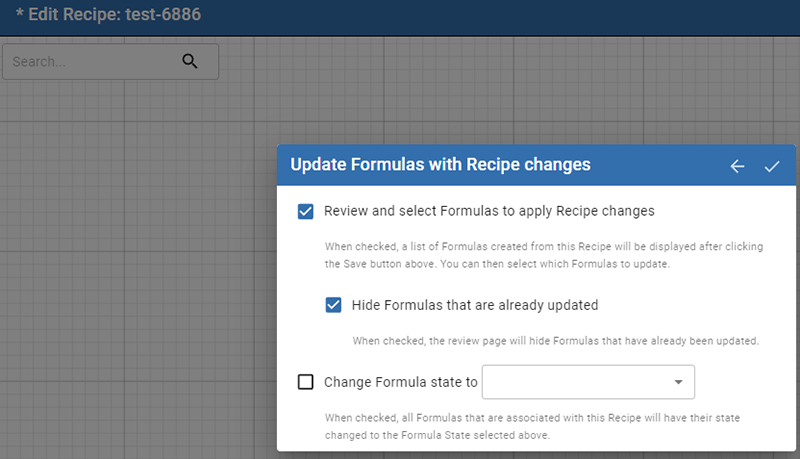
When using Batch Formulas and adding or modifying procedure parameters, the system will notify when the parameters need to be synced to the recipe.
For details, see Batch Procedure Formula.
Phase Parameters
Each system batch-phase, referred to as base-phase in the system, has a set of default parameters that are related to the phase's purpose. When you create your own phase based on one of the base phases, the default parameters are also created in the custom phase.
You can add parameters to base phases and custom phases. Each parameter has a set of properties. Some of the properties are set to read-only in the system; Some of these you can change permissions on and others that are not editable.
When a phase, base or custom, is exposed to the Ignition Tag Provider, parameters are added for basic control including command-state control and output/input parameters for equipment.

|
Always resave Batch Recipes after adding, deleting or modifying parameters. |
What is the impact of modifying parameters in a Master Recipe and how to ensure those changes are applied to batches
When you modify parameters in a Master Recipe using the Recipe Editor, these changes are not automatically propagated to existing batches of a Site Recipe in the Batch Queue. The system creates a copy of the Master Recipe as a Site Recipe when it's selected for a batch, and any subsequent parameter changes only affect the Master Recipe itself. To propagate these changes, you must save the Master Recipe. Although the source notes that "the batch recipe can be loaded using scripting and then immediately saved," the primary instruction is that saving changes in a Master Recipe is essential for them to propagate to a Site Recipe when it is copied.
Using Parameters in Batch Recipes
Properties Common to All Phases
Sepasoft MES Module Suite