Sepasoft MES Module Suite
Batch Procedure Formulas
Batch Formulas are comprehensive datasets that precisely define the quantities of materials and optimal settings necessary for producing a batch of products. These formulas offer the flexibility to introduce numerous variations to a Batch Recipe without altering the core process logic.

|
Version Specific Available in 3.81.11 RC 1 Batch Procedure Module and later. |
You can use the Batch Formula Manager Perspective component or scripting to modify master recipe parameter values for formulas.
See:
- Batch Formula Manager
- Batch Formula Objects
- Batch Formulas Scripting Functions
- Batch Formula Scripting Examples
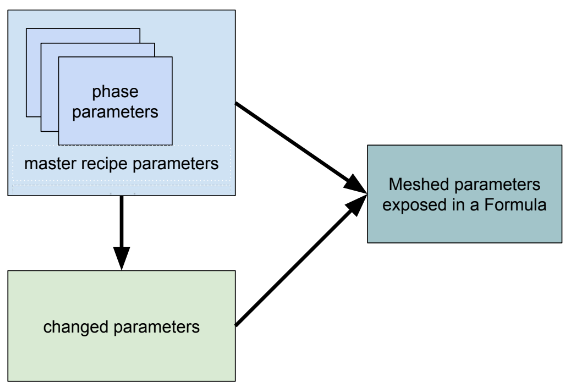
When adding a batch based on a formula to the batch queue a meshed list of modified and unmodified parameters display.
MES Enterprise Synchronization
The reference is a one-to-many relationship from a master recipe to formulas, i.e., a formula must reference one master recipe to be valid. Only valid formulas are synchronized in an MES enterprise network.
Validated Formulas
Sync downward
Formula follows the Master Recipe that it is linked to. If the recipe syncs to a site, then the formula and its class sync to that site.
Sync upward
All Formulas and Formula Classes sync upward, following the recipe they are linked to.
Managing Formulas with eSignatures
- eSignature templates can control who can execute (queue and run) a batch on a formula as well as who can edit formulas. Capture user login information by setting the template to always require a login.
For reference, see:
- Batch Procedure Framework
- Batch Recipes
- Batch Procedure Phases
- Batch Procedure Parameters
- Parameters in Formulas
- Batch Formula Objects
- Batch Formulas Scripting Functions
Sepasoft MES Module Suite