Sepasoft MES Module Suite
Viewing Recipe Change Log
The Settings & Changeover Module provides components, scripting functions and analysis providers that all provide access to stored recipe data. All of these can be used to create screens and reports to display recipe information.
Recipe Analysis
Each MES module has an analysis provider that works with the data collected. The Settings and Changeover Module, has four analysis providers, one of which is the Recipe Change Log. This can be used to query change log history information based on your selections.
- Compare recipes
- Review recipe change logs
- Review production-run variances
When you add the Ignition Reporting Module, you can also create multi-page reports with the recipe analysis information, and more.
Recipe Change Log
The Recipe Changelog Viewer component provides a simple method to view changes made to a recipe.

Recipe Changelog Viewer component
Combined with a MES Object Selector component to provide an equipment path filter, and with a Recipe Selector Combo component to provide a recipe name filter to the Recipe Changelog Viewer, you can filter which recipe changes are shown.
The Recipe Change Log Provider and legacy analysis components can also be used to return Change log information.
Recipe Variance Log
The Recipe Variance Viewer component provides a simple method to view variances between recipe setpoints that were downloaded and any changes made during the production run.
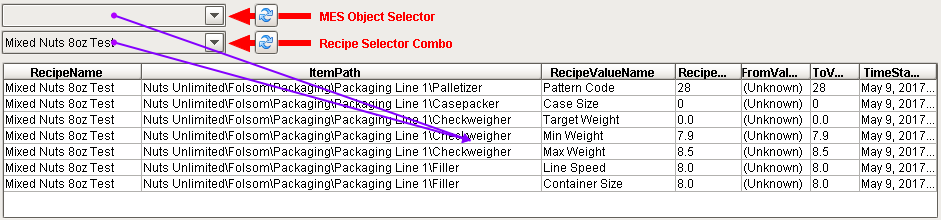
Combined with a MES Object Selector component to provide an equipment path filter, and with a Recipe Selector Combo component to provide a recipe name filter to the Recipe Variance Viewer, you can filter which recipe variancesare shown.
The Recipe Variance Analysis Provider and legacy analysis components can also be used to return recipe variance information.
Using The Recipe Analysis Providers
The legacy analysis components, Production Analysis Selector, Production Stored Analysis Selector and Analysis Controller can also be used to return recipe information. They are considered legacy as they were replaced by the MES Analysis Controller etc. components in MES 2.0 for OEE Downtime, however SPC, Recipe and OEE 1.0 still use the legacy components. SPC for MES 3.0 and MES 4.0 and Recipe for MES 3.0 and MES 4.0 uses the MES Analysis Controller.
The built-in analysis components allows you to compare two or more recipes, review recipe change logs, and review production-run variances. You can create multi-page reports with the recipe analysis information and the Ignition Report Designer. The image below shows the Impromptu Analysis screen where a recipe C1 6Pk is being compared to its parent Master C. Filters and data points can be selected using the Production Analysis Selector component, but the Analysis Controller component and system.mes.analysis.createMESAnalysisSettings scripting function will allow requesting comparisons of recipes without the user interface. The filters and data points are defined through the component properties.
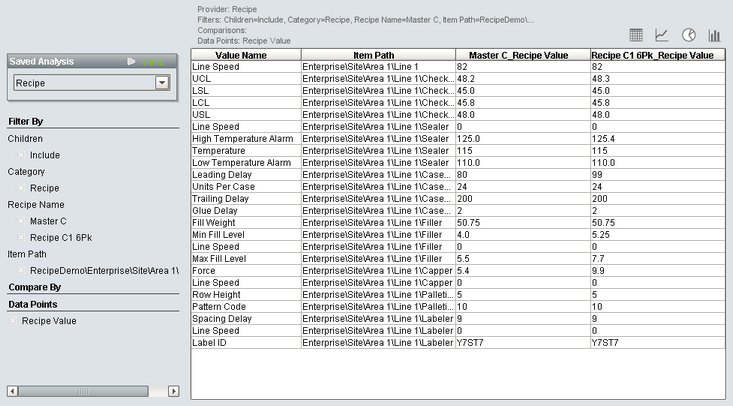
The Recipe module provides four analysis providers that can be used to analyze differences between recipes, variances and change logs.
- Settings Recipe Analysis Provider
- Settings Recipe Variance Analysis Provider
- Settings Recipe Change Log Analysis Provider
- Sub Product Code Variance Analysis Provider
Sepasoft MES Module Suite