Sepasoft MES Module Suite
Batch Procedure Recipe Authoring
A recipe's phases and logic specify when the steps are to occur, in what order, and what the transition conditions are between steps. A step could be one phase, one unit procedure with one operation and phases, as well as the complete hierarchy as defined by the ISA-88 guidelines. The equipment executes the phase logic, reports on the phase status, and reports parameters to the batch engine.
Create batch recipes in Batch Recipe Editor.
See Batch Procedure Recipe Elements.
The same recipe can be used with different equipment provided the unit and phase configuration implements the same phases or subset of phases.
When you save a recipe, it becomes a Master Recipe in the system. Each time it is executed, a copy of it is created, called a Control Recipe, and executed as a Batch. Any changes made to a Master Recipe do not immediately affect batches. Batches executed after saving a Master Recipe do include changes prior to that save.

|
Complete these steps to start authoring recipes:
Step 4 Associate Unit Classes to Equipment Units. See Batch Unit Manager.
|
Authoring Recipes in Batch Recipe Editor
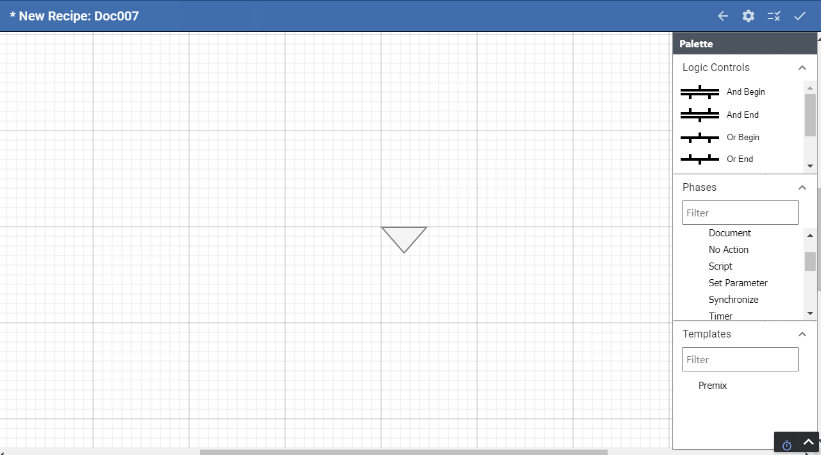
Adding Recipe Elements to the Design Space
When you create a recipe, the design space opens with the Begin control.
- Keyboard Arrows move the design space.
Toggle functionality of mouse-scroll with a press:
- Scrolling moves the design space vertically
- Scrolling increases or decreases the magnification.
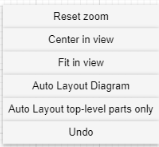
Right-click Menu
The items in the Phase Palette are driven by the item selected in the Design Space.
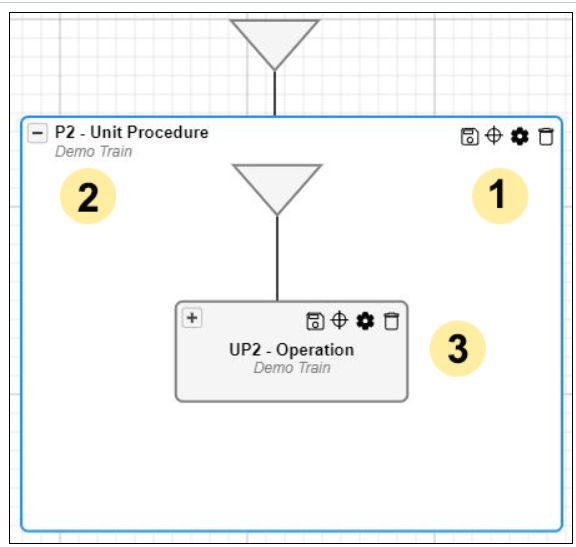
|
A Unit Procedure and Operation
|


Related Knowledgebase Articles:
Sepasoft MES Module Suite