Sepasoft MES Module Suite
Permissive Start in Batch Control

|
Version specific: In MES 3.81.13 RC1 including MES 4.83.2 RC1, and later. SP Release: 3.81.13 SP0 and 4.83.2 SP0 |
Permissive Start is how Batch Procedure handles a normal equipment condition: the batch engine has issued Start to an ISA-88 equipment phase, but the PLC remains in Idle because a field permissive (an on-site interlock) has not yet cleared. Examples include a closed access door, a valve not in the required position, or another safety condition the PLC must satisfy before it transitions to Running.
On permissive-capable phase types, this condition is not treated as a communication fault or a rejected command. The engine enters a Permissive-pending wait: it keeps polling the PLC, surfaces the pending permissive to the operator, and waits for Running (or Complete) before advancing the recipe.
For general batch execution concepts, see Batch Procedure Overview. For the full ISA-88 command/state rules that define Permissive Start, see ISA-88 State Transition Matrix.

|
Permissive Start is intended for operational coordination. It is not a replacement for safety-rated interlocks. |
When Permissive Start Applies
Permissive Start applies only when all of the following are true:
Condition | Detail |
|---|---|
Command issued | The batch engine has written Start (Command_Number = 1) to the equipment phase. |
Legal source state | The PLC reported Idle (State_Number = 1) as the source state for Start. |
PLC still Idle | After Start is written, the PLC continues to report Idle because a field permissive has not cleared. |
Handshake valid | Handshake_Valid is true — the MES gateway and PLC are communicating normally. |
Phase type | The step is a permissive-capable phase (see below). |
PLI state handling | The phase uses PLI state transition handling (State_Transition_Handling = PLI), where the PLC drives state transitions from commands. |
Permissive-capable phase types
Phase type | Typical use |
|---|---|
Equipment Phase | Unit equipment driven by ISA-88 commands and state tags |
Synchronize | Coordination between units or batch segments |
Transfer In | Material transfer into a unit |
Transfer Out | Material transfer out of a unit |
Other phase types — Script, Timer, Document, User Message, Allocate, Value Prompt, and similar — are not permissive-capable. If the PLC (or step logic) remains in an unexpected state after Start on those phases, the engine applies standard timeout and fault rules instead of Permissive-pending.
Intended Use
Permissive Start exists so batch execution can cooperate with field equipment logic instead of fighting it.
What problem it solves
In many plants, the PLC will not leave Idle until local conditions are safe — even after it has accepted a Start command. Without Permissive Start, the batch engine might treat “Start sent, still Idle” as a fault, fault the step, or escalate to a communication error while the PLC is behaving correctly.
Permissive Start tells the engine: wait; this is expected.
Typical scenarios
Scenario | Operator / field action |
|---|---|
Access interlock | Close and latch a door, hatch, or guard so the PLC permissive clears |
Position interlock | Move a valve, agitator, or mechanism to the required state |
Upstream readiness | Wait for another unit or utility signal the PLC requires before Running |
Transfer coordination | Clear transfer permissives on Transfer In/Out or Synchronize steps before material moves |
What the batch engine does
While Permissive-pending:
Keeps the Start command in effect and continues polling State_Number, handshake tags, and equipment parameters.
Does not classify the condition as a communication fault while Handshake_Valid remains true.
Surfaces the pending permissive to the operator (typically through the Equipment Message parameter on the active step, shown in Batch Controller).
Arms the Start timeout (T_start) — see Timeouts.
Treats Running as success immediately — if the PLC transitions to Running (or Complete) at any point during the wait, the Start is considered successful and the recipe advances.
Python |
sequenceDiagram participant Engine as Batch engine participant PLC as Equipment PLC participant Op as Operator Engine->>PLC: Write Start (Command_Number = 1) PLC-->>Engine: State = Idle (permissive not clear) Engine->>Engine: Verdict = Permissive-pending Engine->>Op: Show pending permissive (Equipment Message) Op->>PLC: Clear field interlock PLC-->>Engine: State = Running Engine->>Engine: Verdict = Success, advance recipe |
Who is involved
Role | Responsibility |
|---|---|
Operator | Read the pending permissive message, clear the field condition, confirm equipment is safe to run |
Process engineer | Configure equipment phases, PLI tags, permissive logic in the PLC, and optional T_start timeout |
Supervisor | Intervene with Hold, Stop, or Abort if the condition cannot be cleared within SOP limits |
What Operators See
During Permissive-pending:
The batch and step remain active — the recipe has not faulted solely because the PLC is still Idle.
Batch Recipe Monitor shows the step in Idle (or the active step context) while the engine waits.
Batch Controller (bound to the active step) is the primary surface for the Equipment Message text the PLC publishes describing which permissive is blocking Start.
If the PLC requires acknowledgment for messages, use the same acknowledge workflow as other equipment messages on that step.
Permissive-pending is an operator-actionable wait: the operator is expected to clear the field condition or escalate if it cannot be cleared.
Timeouts
Permissive Start uses the equipment Start timeout (T_start), configured per equipment phase by process engineering.
Phase category | Idle after Start (handshake valid) | Behavior |
|---|---|---|
Permissive-capable | Expected when a field permissive is blocking | Remain Permissive-pending until T_start expires or Running is observed |
Non-permissive | Not a valid permissive wait | Treated as command not accepted — escalate to Funnel or fault per policy after T_start |
Default: T_start is typically indefinite (no automatic escalation). When a finite timeout is configured and expires, the engine logs a warning and applies the configured timeout policy.
Immediate escalation: Loss of Handshake_Valid is not part of Permissive Start. A false handshake triggers a communication fault immediately, independent of T_start.
What Permissive Start Cannot Do
Understanding these limits avoids misconfiguring recipes or expecting the engine to override field logic.
Cannot bypass field interlocks
Permissive Start waits for the PLC to clear permissives. MES does not force Running, override safety logic, or skip interlocks. The operator or field equipment must satisfy the PLC condition.
Cannot apply to all phase types
Only Equipment Phase, Synchronize, Transfer In, and Transfer Out steps with PLI state handling use Permissive-pending. Script, Timer, Document, and other non-equipment steps do not participate. On those steps, unexpected Idle after Start is handled as a command or state error, not a permissive wait.
Cannot pre-check permissives before issuing Start
The batch engine issues Start when the recipe reaches the step and the phase is in a legal Idle state. It does not block Start based on field permissives known only to the PLC. Permissive evaluation happens after Start is written.
Cannot substitute for communication health
If Handshake_Valid becomes false, the batch freezes with a communication fault — even if the last reported state was Idle with a pending permissive. Permissive Start applies only while the PLC handshake is valid and responsive.
Cannot recover from desynced or terminal states
Permissive Start applies to Start from Idle with the PLC still reporting Idle. It does not apply when the PLC reports states such as Stopped, Aborted, Paused, or Held while Start was expected. Those cases use Confirm, Wait, or Funnel recovery per the ISA-88 decision matrix — not Permissive-pending.
Cannot apply to Restart or Resume
Restart (from Held) and Resume (from Paused) have their own decision-matrix rows. Permissive-pending is specific to Start targeting Running from Idle.
Cannot be used to mask a PLC that never accepts Start
On non-permissive-capable phases, remaining in Idle after Start beyond T_start means the command was not accepted — the engine funnels or faults per policy. Permissive Start does not extend indefinite waiting to phase types that do not support it.
Cannot be bypassed from scripts
Gateway and client scripts can issue batch and step commands, but they cannot force the engine to treat a stuck Idle state as success on a permissive-capable phase. The engine still waits for PLC-reported Running (or applies timeout policy). Scripts also cannot bypass electronic signature requirements for signed commands.
syncPLIStepState aligns MES step state with the active command for PLI phases; it does not clear field permissives or force Running when the PLC is legitimately blocked in Idle.
Cannot display raw PLC fault codes in the operator UI
Operator-facing surfaces show equipment messages and generic alarms with reference IDs. Raw PLC fault text is logged server-side per product policy — Permissive Start does not change that rule.
Cannot guarantee queue-level “permissives clear” before batch Start
Batch queue Start pre-checks (units assigned, materials available, and similar) are separate from equipment-phase Permissive Start. A batch can move to Running at the recipe level while an individual equipment step later enters Permissive-pending when its PLC permissive blocks that step.
Configuration Checklist (Process Engineers)
Use a permissive-capable phase type for steps that depend on PLC interlocks before Running.
Set State_Transition_Handling to PLI on the step or phase so the PLC owns state transitions.
Bind Command_Number, State_Number, and handshake tags to the unit class equipment model.
Publish the blocking permissive text to the Equipment Message tag/parameter so operators know what to clear.
Set T_start intentionally — indefinite wait (default) vs. a finite SOP timeout with escalation.
Validate PLC logic: after Start, remain in Idle only while a true permissive blocks; transition to Running when clear.
Related Documentation
Document | Contents |
|---|---|
Recipe hierarchy, execution flow, operator surfaces | |
Start batch command and equipment notes | |
syncPLIStepState Script Function | Manual PLI state alignment (not a permissive bypass) |
Live diagram and step selection | |
Phase types and equipment parameters |
Key characteristics
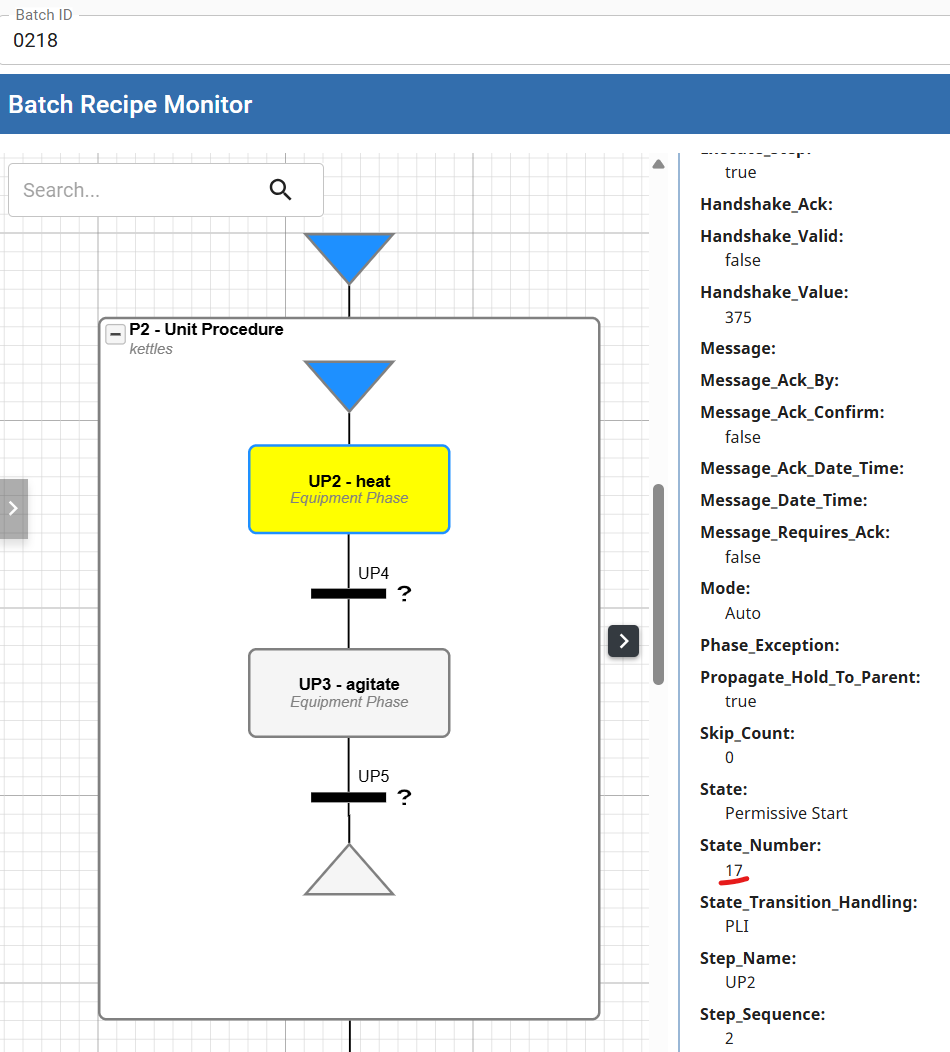
- Control: The "Permissive Start" state can only be set by field equipment. State number is '17'.
- Operational Behavior: When a phase is activated, if the state is currently "Permissive Start," the system waits for the state to transition to "Idle" before issuing the "Start" command. See Permissive Start in Batch Command Life Cycle below.
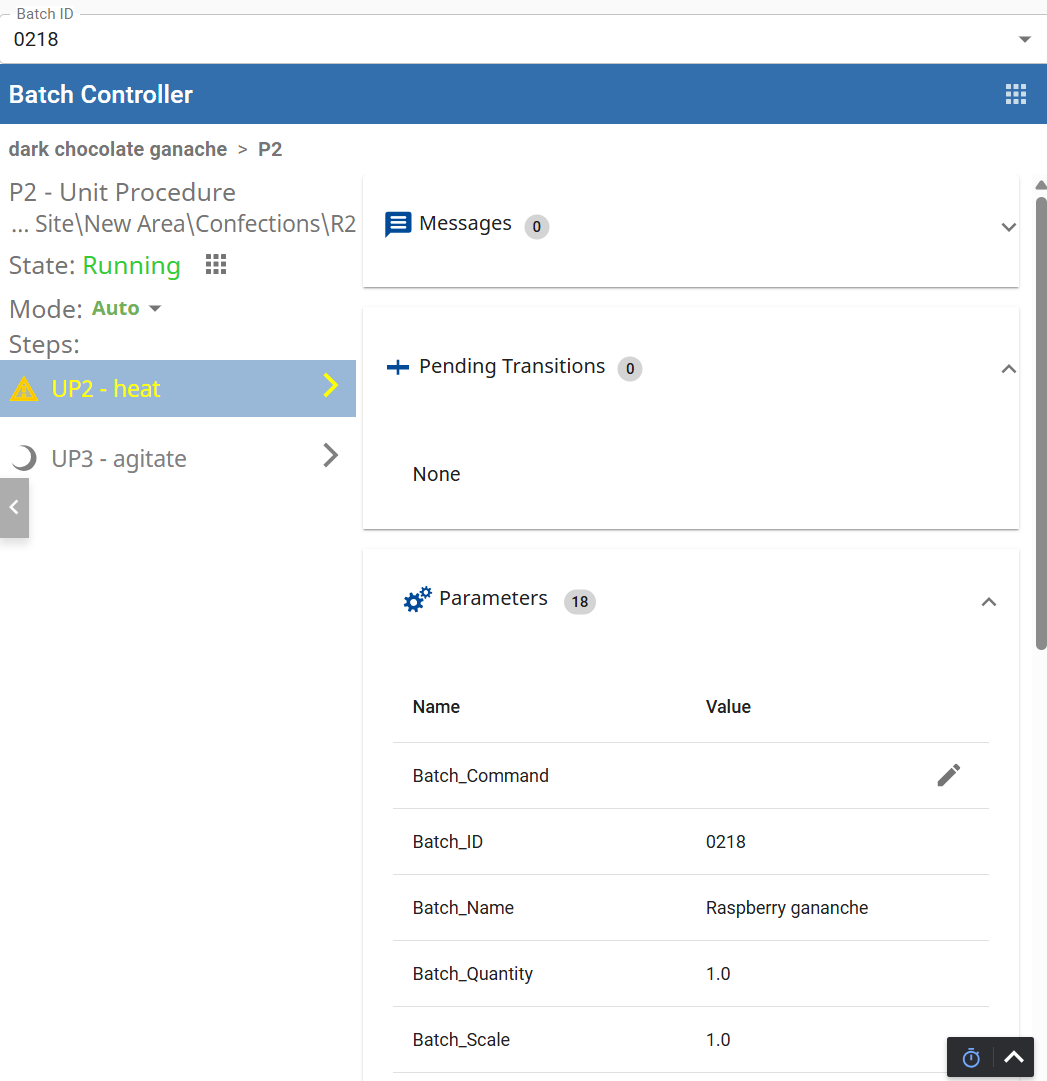
- Visual Indication: To alert that a phase requires attention, the Batch Monitor and Batch Controller components display steps in the "Permissive Start" state in yellow by default, though this color can be customized.
Permissive Start indicator in Batch Monitor
Permissive Start indicator in Batch Controller
In Batch Record (EBR)
- Data Recording: When an equipment phase is activated, the "Permissive Start" state and any "Message" parameters set by the PLC are recorded in the Electronic Batch Record (EBR) and displayed in the Message List
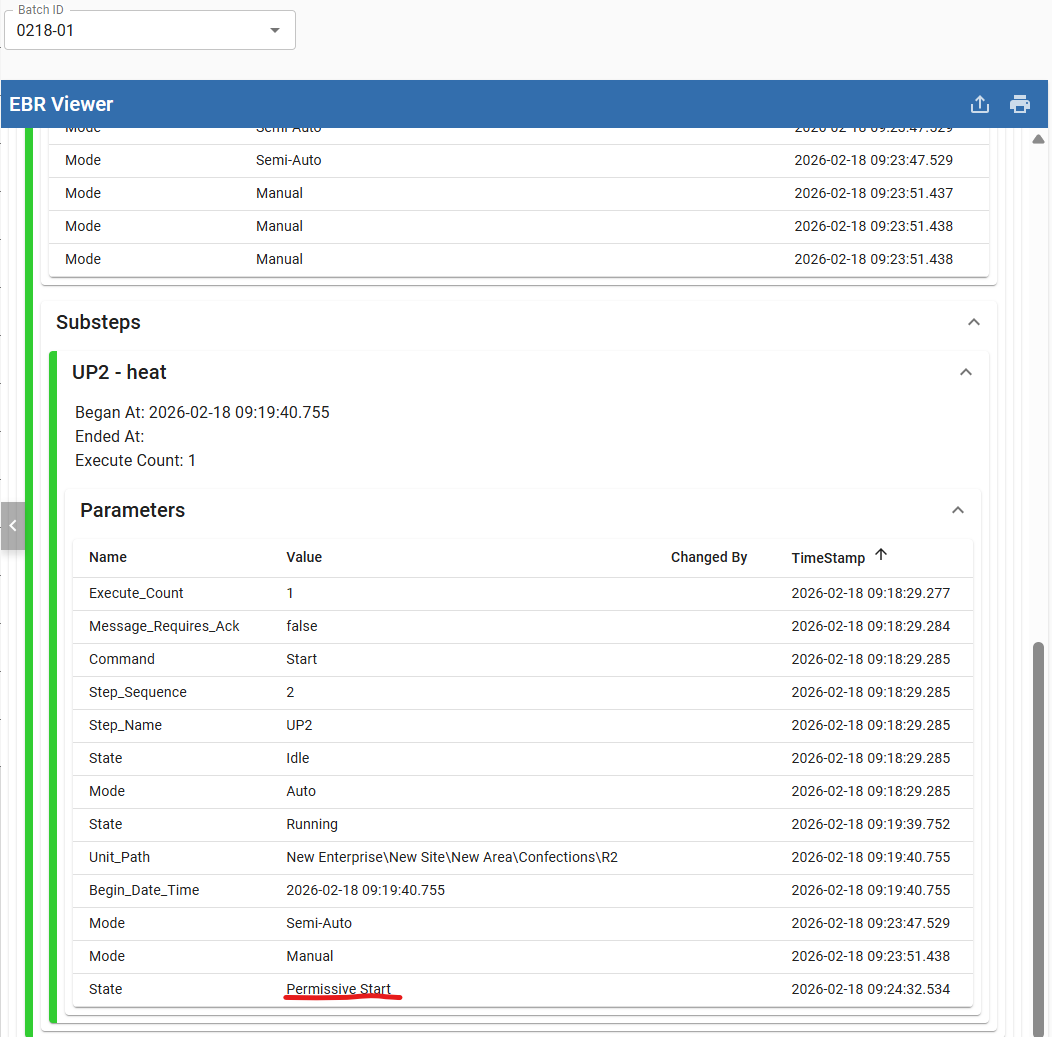
Permissive Start in Batch Command Life Cycle
When an element is activated, the current State determines the specific command issued to the phase. For instance, if the State is Complete, a Reset command is issued. If the State is Permissive Start, the system waits for the state to transition to Idle before sending the Start command.
See the State Transition diagram for the state-command lifecycle.
Sepasoft MES Module Suite