Sepasoft MES Module Suite
Batch Procedure ISA-88 Based Communication Model
This information details the command and state lifecycle within the Sepasoft Batch Procedure module. The communication model is fundamentally based on the ISA-88 standard for batch control, a widely adopted framework for designing and implementing flexible and modular batch manufacturing systems. A thorough understanding of this model is critical for engineers responsible for interfacing the batch execution system with Programmable Logic Controllers (PLCs) and ensuring the robust, reliable execution of batch recipes.
The primary method for communication between the Sepasoft batch engine and a PLC is the Phase Logic Interface (PLI). The PLI defines a standardized structure for the tags used to pass data, such as commands, states, and process parameters, back and forth between the two systems. The core principle of this model is a clear division of responsibility: the Batch Engine is the master of what to do (Commands), while the PLC is the master of its own condition (State). This ensures that both the high-level recipe execution engine and the low-level equipment control logic operate in a synchronized and predictable manner.
At the core of this model is the relationship between Batch Equipment Phases (defined in the recipe) and the equipment phases implemented in the PLC). There is a direct, one-to-one mapping between them. For instance, a batch phase named "Add H2O" in a recipe corresponds to a matching "Add H2O" equipment phase programmed in the PLC. This direct correlation simplifies logic development and troubleshooting by creating a clear and consistent structure.
- Command: A human-readable string value (e.g.,
Start,Stop) sent from the batch engine to the PLC to initiate an action.
- Command_Number: The numeric equivalent of the
Command(e.g.,1for Start), which is more efficient for PLC logic to process.
- State: A human-readable string value (e.g.,
Running,Complete) indicating the equipment's current condition.
- State_Number: The numeric value of the
Statereported by the PLC, which the batch engine monitors to track phase progress.
Interfacing Sepasoft Batch Procedure Module with PLC - PDF Download
The Core Components: Commands and States
Command_Number and State_Number) is significantly more efficient and reliable for PLC logic. This approach simplifies programming by allowing the PLC to handle simple integer comparisons rather than complex and error-prone string processing.For more information, see Batch Command Life Cycle.
Batch Procedure Component to Control Batch Runs
Batch Procedure components and scripting functions to add and run batches:
- Batch List
- Batch Recipe Monitor
- Batch Controller
- Batch Procedure scripting functions: system.mes.batch.queue
Initiating Batches from an Enterprise Gateway
 |
The root gateway server within an MES Enterprise Gateway Network can initiate batch commands on child gateway servers. For more info, see MES Enterprise Network. |
Batch Execution Modes
Auto: batch engine runs the command sequence.
Manual: operator controls the commands.
Semi-Auto: phases run as in Auto; Transitions evaluate but do not allow the batch to continue without operator input.
In scripting, use:
system.mes.batch.queue.setMode(batchQueueEntry, mode, path, changedBy)
Phases that Support Execution in Manual Mode
- Document
- Equipment Phase
- Script
- Set Parameter
- User Message
- Value Prompt
Batch Running in Auto Mode
This is a summary of a Batch Recipe Mode set to Auto and each phase in the recipe has its State_Transition_Handling parameter set to PLI.
Once a batch is started and a phase becomes Active, these actions happen:
|
|
When a batch is running, there is a one-to-one relationship between the Unit Procedure in a Batch Recipe and a Unit within the Equipment Model. The Unit is allocated to the Unit Procedure when that Unit Procedure step becomes Active. |
- Batch sends Output Parameters and the Start command to the equipment.
- The equipment sends back the Running state.
- Parameters values can change.
- Equipment sends read-only Input Parameters.
- Depending on the Recording Type property, values are recorded to history.
Expand to learn about the Recording Type property
Parameter Properties
Depending on the phase and scenario, a property may be read-only.

|
| Property Name | Options | Description | ||||||||||||||||||||
|---|---|---|---|---|---|---|---|---|---|---|---|---|---|---|---|---|---|---|---|---|---|---|
| Recording Type | All to History | Parameter values on a regular update-interval are recorded to the database for MES Analysis use. | ||||||||||||||||||||
All to Object | Parameter values are saved against the MES Objects to ensure continuity of operation in case of power outage or server restart. | |||||||||||||||||||||
All to Object and History | Parameters are saved to both the object and history. | |||||||||||||||||||||
All to Object and Last to History | See “All to Object” above. Last values indicate only final parameter values are saved to history DB tables for analysis. For example, rather than an accumulated counter for quantity, only the final quantity would be recorded. | |||||||||||||||||||||
Changes Not Saved | Parameter values are not recorded. | |||||||||||||||||||||
Last to History | Parameter values are saved at the end of the phase to the DB for exposure to analysis. | |||||||||||||||||||||
| Value Source | Recipe | Gets the value from a recipe parameter before the batch starts. | ||||||||||||||||||||
| Execution | Gets value at runtime, once the batch has started. Runtime options are: the parameter value set in phase configuration, tag engine, and scripting. | |||||||||||||||||||||
| Recipe and Execution | Gets the value before the batch starts AND gets the value at runtime, once the batch has started. | |||||||||||||||||||||
| Monitor | Captures values from the equipment. Configure tags for history timeframe. When selecting Monitor, the parameter value becomes read-only, and a default value will not be set. The system checks every 100 milliseconds but only writes changes to history when the value changes. Monitor is intended for listening and recording in history values from the PLC. An example is Actual Temperature (PV_Temp) where the PLC has complete control of changing the value and the Batch Module only listens and records the value. Only accessible in Phase Manager. | |||||||||||||||||||||
| Synchronization Manager | Set on the receiving phase within a Sync Group of Synchronize Phases. | |||||||||||||||||||||
| Neither | These are parameters used internally by the Batch engine and cannot be changed via UI nor scripting. | |||||||||||||||||||||
| Tag Type | Memory | Parameters are instantiated in the Phase UDT as memory tags. | ||||||||||||||||||||
OPC | Parameters are instantiated in the Phase UDT as OPC tags. | |||||||||||||||||||||
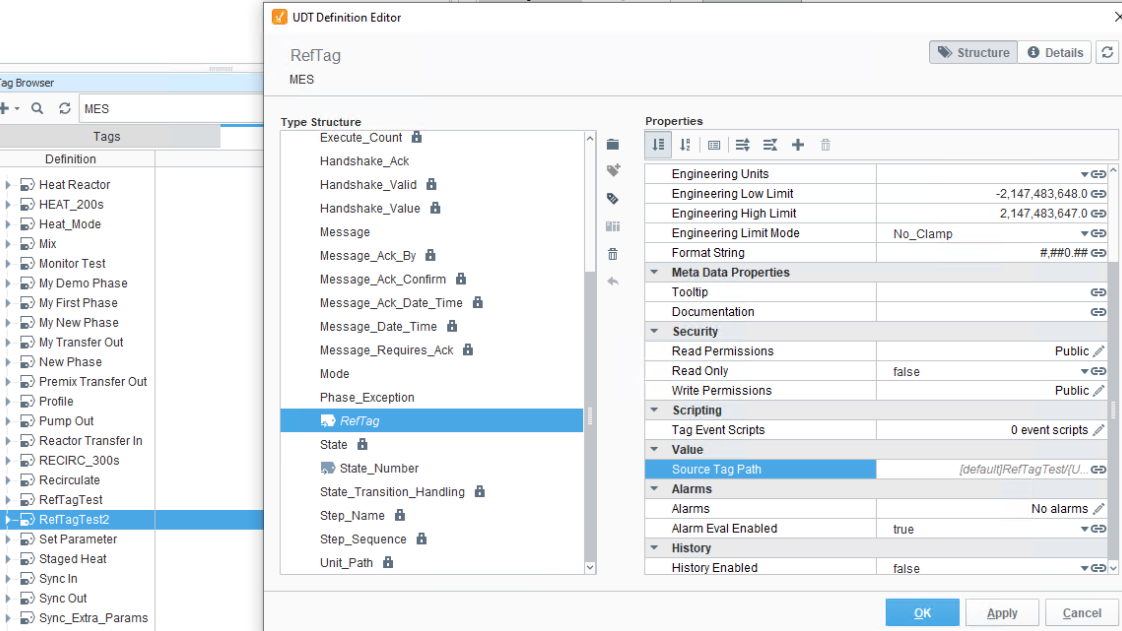
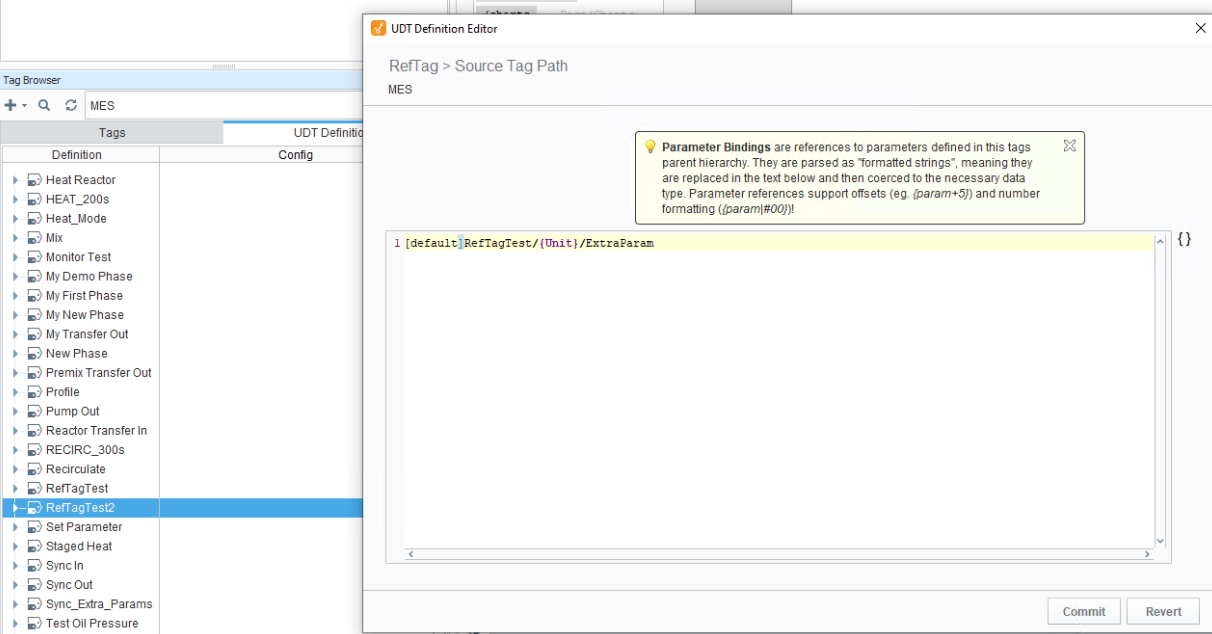
Reference | Parameters are instantiated in the Phase UDT as reference tags. You can set source tag paths for remote tags. For example:
  | |||||||||||||||||||||
| Calculation | Expression | Used for reference to another field or parameter OR when a unit of measurement needs to be calculated. Single line of Python. This is a function that is injected into a system Python. (Not available with the ENUM data type.) Start with a forward slash to set a path from the root of the procedure or recipe hierarchy. param(“/{}.Unit_Path”)
Use curly brackets to set at the current level within the hierarchy, e.g., param(“{}.Unit_Path”)
| ||||||||||||||||||||
| Data Type | Possible Data Types
|
When a Transition evaluates to True, Batch Engine sends the Stop command.
- Equipment responds with Stopping, and then Stopped
- Phase Completed.
- Operation and/or Unit Procedure Complete depending on the recipe structure.
Batch Engine sends the Reset command.
- Equipment sends Resetting and the Idle.
Phases that Support Force Complete
- Timer
- Equipment Phase
- Synchronize
- Transfer In
- Transfer Out
Messages during Batch Execution
Operator messages and messages coming from a PLC can be viewed in Batch Message List and Batch Controller.
Enterprise Network and Site Configuration by Script
In an enterprise network, you may want to add batches to a queue on a child site server via script.
See:
Sync Group Handshake
See Synchronize Phase.
Sync flags are set either by the batch system or manually.
|
|
If setting manually, make sure to set them after a Reset command is received from the batch engine. |
A Sync_Mode = Auto sets the Sync_Flag_Complete = True .
When all the phases within a Sync_Group have Syn_Flag_Complete = True , then the Sync_Confirm_Complete = True .
When the Phase sees Sync_Confirm_Complete = True , it sets Complete = True .
Sepasoft MES Module Suite