What is Batch Procedure
The Sepasoft Batch Procedure system is a low-code tool for developing flexible production control in batch processing as well as procedures and automated workflows.
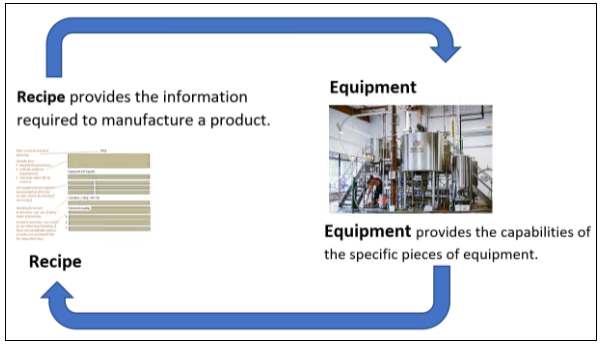
Developed with real-world user input and the standards defined in the ISA88: Batch Control and ISA106: Procedure Automation for Continuous Process Operations specifications.
Standards and Design Best-Practices support Maintenance and Development
- Manufacture multiple products using the same equipment.
- Utilize different equipment for producing the same product.
Batch Recipe Workflows
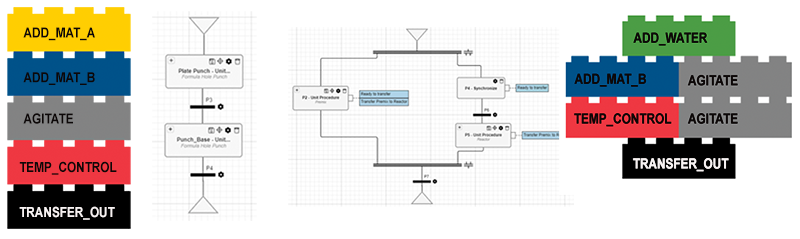
A batch recipe consists of a logical sequence of phases. Batch Procedure provides a ready set of built-in phases for common elements of recipes and workflows; For example, timers, document phase, and e-Signature templates
You can create your own based on existing phases. See Base Phases.
You can build recipes using visual web-based editors and scale and strategize with scripting the framework and logic. Data flows can be set up for production and analysis.
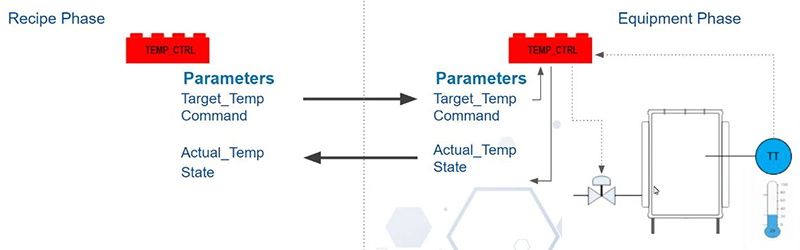
Batch Procedure looks at the lowest level of work as an element to use and reuse as phases. An equipment phase is configured to communicate with the PLC on a piece of equipment. See Interfacing Batch Procedure Phases with PLCs.
What Is a Phase
A phase is a building block. Phases can define materials, procedural parameters and equipment parameters. You can reuse building blocks across recipes and procedures.
Equipment Phase Parameters
- Output Parameters: Come from Ignition tags under a Unit and go to the control component.
- Input Parameters: Come from the control component and go to the Ignitions tags for a Unit in Ignition.
- Installing Batch Procedure
- Batch Procedure Framework
- Batch Procedure Formula
- Using Batch Components
- Batch Recipe Authoring
- Batch Procedure Phases
- Batch Procedure Phase Parameters
- Batch Procedure Equipment Phase Configuration
- Controlling Batch Runs
- History and Reporting for Batch Procedure
- Batch Report
- Electronic Batch Record
- MES Features Integrated with Batch Procedure
Batch Scripting: