Sepasoft MES Module Suite
Enterprise Network
In Ignition 8.3.x:
- In Ignition Gateway, go Platform > Sepasoft > Enterprise Network.
In Ignition, 8.1.x:
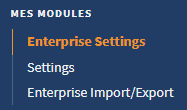
- In Ignition Gateway, go to Config > MES Module > Enterprise Settings.
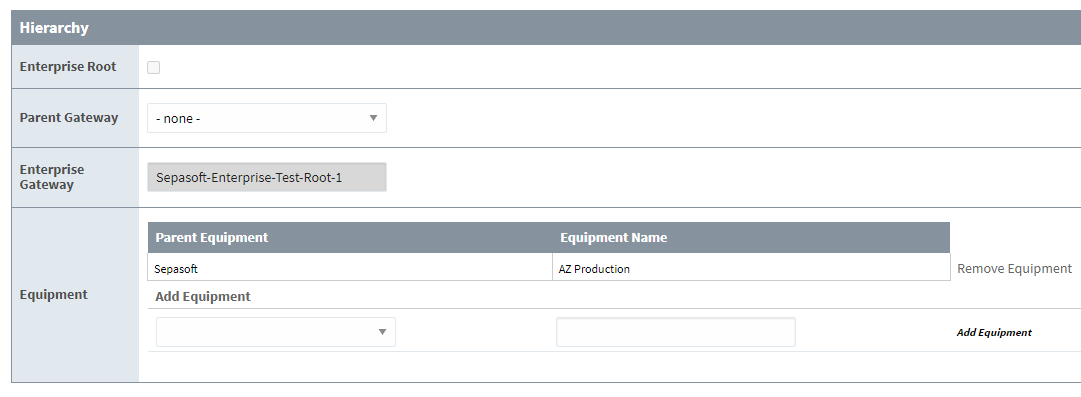
Enterprise Settings Hierarchy
| Enterprise Root | Sets the server as the root of the gateway network. The root server manages all connected gateway servers with enterprise server-administration access. |
| Parent Gateway | Sets the direct parent connection when the operations and equipment of a gateway server is managed by a server other than the root enterprise server. |
| Enterprise Gateway | Read-only showing the name of the gateway that you are viewing. |
| Equipment |
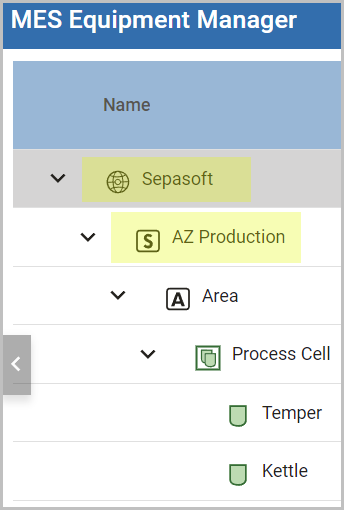
Shows the equipment that is currently managed. Allows you to add equipment to manage by the gateway. In the screenshot above, you can see references to the Production Equipment Model. The enterprise and the site levels are listed.
|
MES Enterprise Network Setup
Make sure to review the preparation topic before configuring: Preparing before Configuring MES Enterprise Network
Scenarios detailed in this section:
-
Add New Enterprise Server and New Site Server
-
Add New Enterprise Server and New Site Server with Existing Stand Alone Gateway
-
Add New Enterprise Server and New Site Server with Existing Configuration and Data
- Add New Site Server to Existing MES Enterprise
To set MES Enterprise Network Settings:
These settings should only be modified under direct instruction from Sepasoft Technical Support or Design Consulting. Adjusting them independently may negatively impact Enterprise Synchronization behavior and performance due to complex interactions between settings.
- In Ignition 8.3.x, you need to click the I Understand button.
- In Ignition 8.1.x, you must enable by checking the Show Advanced Options in the Config > MES > Enterprise Settings gateway page.
Sync Settings
| Data Retention Period in Days: |
This specifies how far back data should be kept on this gateway in days. A value of -1 indicates data should always be kept. Tag Collector values: The system keeps one value before the cutoff date. The data-retention policy is evaluated five minutes after a Production module restart, then every 24 hours based on the time zone of the Ignition Gateway. List of data that is synchronized and retained:
|
||
| Send Values at This Rate (millis): | This is the rate analysis data that is synced up from a child to parent gateways. This is the time in between synchronization. This value defaults to 60000 milliseconds (1 minute), however best results are found with 300000 to 600000 milliseconds (5 - 10 minutes) between updates. | ||
| Maximum Pending Records to Save: |
This is the maximum amount of rows that are sent per analysis sync cycle. Parent server: size of the incoming data queue Child server: size of the outgoing data queue |
||
| Maximum Number of Tag Collectors to Check |
This controls the maximum number of MESTagCollectorProperty to check for updates each cycle Included in Sepasoft Versions:
MES 3.81.1 SP8 and later
|
||
| Number of Enterprise Threads: | This is the number of dedicated threads that are used for performing tasks like syncing analysis data. | ||
| Check for Object Changes at This Rate: |
Enterprise Sync The number of seconds between each check of the changelog to determine if MES objects have changed and need to be synced to another gateway. Range in Seconds: 1 - 3600 New settings can be applied without a gateway reboot. |
||
| Maximum Number of Object Changes to Send: |
Enterprise Sync If there are more changes than the maximum, then additional groups of changes is sent after a shorter delay, ignoring the Check for Object Changes at This Rate configuration property. Range for Number of Objects: 1000 - 100000 New settings can be applied without a gateway reboot. |
||
| Maximum Size of Artifacts: |
Enterprise Sync Integer setting for Artifact file size in KB. Min size: 1KB Max size: 1,048,574 KB Only max-size and less is synced. New settings can be applied without a gateway reboot. |
||
| Monitoring Enabled: | This turns off MES monitoring behavior that is used to run the Vision Monitor component and the MES Metrics tags. | ||
| Monitoring Debug Mode: | This turns on additional metrics that are not collected by default. | ||
| Unique Gateway Identifier: | This identifier is used to prefix Auto-Generated Lot numbers as well as to maintain the uniqueness of users from different gateways. | ||
| Required Roles to Edit MES Scripts: | This is a comma-separated list of User Roles that can edit MES Scripts in the designer. This can only be changed on the Enterprise node. |

Sepasoft MES Module Suite