Sepasoft MES Module Suite
State Handling Parameters in Batch Procedure
| Parameter Name | Phases with this parameter: | |||
|---|---|---|---|---|
| State_Transition_Handling | Auto/PLI Auto: When State_Transition_Handling is set to Auto, the Batch Engine drives the Command and the Command drives the State PLI: State_Transition_Handling is set to PLI, the Batch Engine drives the Command, and the equipment PLC drives the State . | Equipment | ||
| Messages_Require_Ack | Displays in a view with the Message List component. These phases have a Message parameter that when set with a message (typically set by the PLC), appear in the Message List and Batch Controller components. If the Message parameter is changed before the user acknowledges the message, then the new message appears. When the user acknowledges the message, the Message_Ack_Confirm parameter is set to true. Also, the Message_Ack_Date_Time and Message_Ack_By parameters are set. The Message_Ack_Confirm parameter can be set as an OPC tag type so that the PLC can know when the user acknowledged the message. | Equipment | ||
| Disable_Complete | Default is false. Set to True to loop through a phase. | Equipment | ||
| Shared_Unit_Path | The units must have the Shared Unit property set to True in the Equipment Manager: equipment displayed in tree. | Allocate Deallocate | ||
| Sync_Group | Use synchronization groups to pass values among phases. | Synchronize | ||
| Syn_Mode | Auto/Manual In Auto, Synchronization Manager starts the Sync_Flag_Complete process. In Manual, another input starts the Sync_Flag_Complete. Process: A Sync_Mode = Auto sets the Sync_Flag_Complete = True. When all the phases within a Sync_Group have Syn_Flag_Complete = True, then the Synchronization Manager sets the Sync_Confirm_Complete = True. When the Phase sees Sync_Confirm_Complete = True, it sets Complete = True. A Transition uses the Complete parameter to continue the execution of a recipe. | Synchronize | ||
| State_Number | Tag Type property is configurable. Value changes are not saved.
See Equipment PLC Commands and States and Batch Command-State Sequence for more information. | |||
| State_Number_Ack | The State_Number_Ack tag echoes the State_Number value, after the MES Batch system receives, verifies, and processes the latest State_Number change successfully. If the supplied State_Number is invalid, or otherwise, fails to be processed by the MES Batch system, then the State_Number_Ack value does not change.
|
|
Unique Parameters for each Phase Type
Expand to learn about phases
What is a Phase
A phase is the lowest level of work effort in a process. In Sepasoft Batch Procedure, phases are used in recipes as reusable blocks of functionality for any type of manufacturing process.
There are two main categories of phases: Equipment Phases that map to physical equipment and Non-Equipment Phases that offer functionality.
Phases can be created, configured, exported, and removed in Phase Manager. In Batch Recipe Editor, phases are added to define a process with data flows and automation.
How to Organize Phases
This organization of steps | Is | ||
|---|---|---|---|
| produce_solution, assemble_engine | Probably too large | ||
| initialize, open_valve, set_timer, close_valve, reset, inspect gasket | Probably too small Safety
| ||
| Add_h20, Add_Material_A, Heat, Transfer, Assembly Station A Instructions | Probably about right These steps are considered the smallest work effort in a recipe. |
Interfacing Batch Procedure Phases with PLCs
An Equipment Phase is the link between a Unit in the Equipment Production Model and the physical equipment. Phases between the batch system and PLC have a one-to-one mapping. Each phase provides parameters. The parameter mappings are based on standard ISA88 and Sepasoft extended features. You can also add parameters to phases.
| Default parameters: | |
|---|---|
| |
| |
| User-Defined Parameters | |
Mapping Batch Phase Parameters with PLC Equipment Phase Parameters
Batch Procedure Equipment Phase Structure
Exposed set to True provides another set of parameters and creates UDT members for binding to PLCs. Provides ISA88 standards with Sepasoft extended parameters used for mapping in PLI (Phase Logic Interface). | 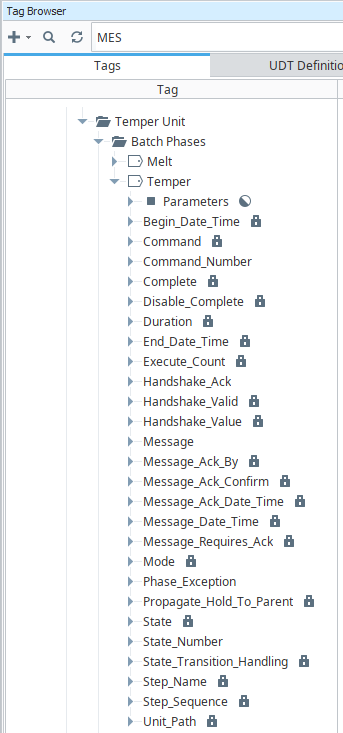 |
Base Phases
Base Phases are provided in the batch system for two uses:
- User Phase: To customize a phase based on a set of functionality, such as a phase designed to allocate a piece of equipment or a phase to capture a signature for authorization. In Phase Manager, you choose a phase as a base. Doing this provides the necessary ISA88 parameters and other parameters based on configuration.
- Built-In Phase: these commonly used phases are provided in the relevant configuration, such as Unit Class Manager and Batch Recipe Editor without customization.
Use Batch Phase Manager to create, edit and delete phases.

|
Renaming a phase in a Recipe or Template in the Recipe Editor also updates any references to that phase automatically. When attempting to delete a phase that is referenced, a dialog displays listing all the references that still exist for that phase. |

|
You cannot delete a phase that is used in recipes or batches. |
Base Phases | Provided in Recipe Editor as Built-In Phase | Summary | ||
|---|---|---|---|---|
Yes | Use this phase to allocate a shared resource. Typically, the shared resource is shared equipment, but it can be used as general locking. The Deallocate Phase should be used to release the shared resource and make it available to other allocation requests. A shared equipment unit is a Unit defined in the Production Equipment Model with the Shared property set to True. If set to True, then only shared equipment functionality applies. | |||
| Deallocate | Yes | Use this phase to release the shared resource and make it available to other allocation requests. | ||
Yes | Document Phases provides displaying documents to the end user when the phase is activated. This supports work instructions that include check boxes, entry fields, content driven by tag values, and content driven by a Phase. Videos can be played by using the HTML5 video element. Unlike images, videos are not embedded directly in the document. This is for two reasons including the size of video files and for best results a video streaming server should be used. | |||
| Equipment | No, only used to create custom user-defined phases | A phase that can connect to equipment controls within the PLC and allow parameter values to flow bidirectionally. This phase type can also use memory and reference tag types. | ||
| Yes | Use this phase to add authorization challenges to a batch recipe. Version Specific
| |||
| No Action | Yes | No-Action Phases are used to do nothing until the following transition evaluates to true. Evaluates conditions and releases allocations. | ||
| Operation | Yes | The Operation within a Batch ISA88 framework is to provide a standard way of defining and controlling operations within Unit Procedures in batch processes. An Operation element is valid within a Unit Procedure. The phases associated to the Unit Procedure, via a Unit Class, is provided in the palette to be used in the Operation. | ||
| Script | Yes | Supports custom Ignition scripts to be run on the Ignition server. Note that client-side scripts are set up in a tag change event. When the script is run, all input parameters of the Batch, Procedure, Unit Procedure, Operation and Script Phase are passed to the script function as a Python dictionary. When the script has successfully completed, all values returned by the script, as a Python dictionary, are assigned to the output parameters. | ||
| Set Parameter | Yes | The Set Parameter Phase is used to set any parameter value within a recipe. | ||
| Synchronize | Yes | Use to synchronize conditions for units when transferring material. Sync_Group with Transfer phases. Use with the transfer phases. | ||
| Timer | Yes | Consists of a timer that can be used by the recipe. The duration can be specified in Days, Hours, Minutes, Seconds or any combination of them. A mode controls the action it must take in the event that the phase goes into the Held state and then is restarted. All timer phases will retain their current state in the event of a power outage. | ||
| Transfer In | No, only used to create custom user-defined phases | Used to transfer materials from a unit with a Transfer Out phase. The Sync_Group parameter is the key for grouping units for material transfer. Set Value Source to Synchronization Manager on the receiving phase within a Sync Group of Synchronize Phases Use the transfer phases together. | ||
| Transfer Out | No, only used to create custom user-defined phases | Used to transfer materials to a unit with a Transfer Out phase. The Sync_Group parameter is the key for grouping units for material transfer. | ||
| User Message | Yes | Configures a message to display in the Message List. | ||
| Value Prompt | Yes | Provides the batch operator a prompt to enter a value for a batch run. |
Exposed
Default Parameters when a Phase has Exposed set to True. When set to Exposed these parameters can be seen in the Ignition Tag Browser.
Expand to learn about parameters when Exposed = True
Phase Parameters Exposed to Ignition Tag Ignition
Batch Phase Parameters map to OPC devices or Ignition Tags as defined in standard PLI (Phase Logic Interface).
When Phases are added to Units in the batch system, Batch Engine creates Batch Phases under the Unit in Ignition Tag Browser. Each Phase has parameters that are used to transfer data values back and forth between the Unit and the equipment module. The values going from the Unit to the equipment PLC-control component are called Output Parameters. The values coming in from the PLC-control component are called Input Parameters.
The batch system has a set of pre-defined parameters such as COMMAND and STATUS, but also allows user-defined parameters that you can configure for values such as Add Amount and Amount Added.

|
Update in 3.81.11 SP11 and later MES-7291
|
Phase Manager > Phase Edit > set Exposed to True.
| Parameter Name | Data Type |
|
||
|---|---|---|---|---|
| Begin_Date_Time | Date | Tag Type property is configurable. Set to Memory by default to create a tag in the Ignition tag browser and saves to the cache and history. | ||
| Command | String |
Tag Type property is configurable. Value Source is driven by Batch Engine or Manually. See Equipment PLC Commands and States and Batch Command-State Sequence for more information. |
||
| Command_Number | Integer |
Tag Type property is configurable. Value source is from execution. Values are not saved. Use Command_Number to write values. The system changes the value of the Command parameter based on the value of Command_Number. See Equipment PLC Commands and States and Batch Command-State Sequence for more information. |
||
| Complete | Boolean |
Tag Type property is configurable. Saved to cache and history. Used in the handshake between phases, see Sync Flags. |
||
| Disable_Complete | Boolean |
True/False | When set to True the equipment does not stop when the step is complete and additional adjustments to parameter values can occur for subsequent instances of the same equipment phase. When the Disable Complete parameter is set to False, the step waits for the State phase parameter to be set to Complete before the step completes. Related Topic: Using a Phase in Multiple Steps. |
||
| Duration | Long |
Tag Type property is configurable. Saves last to history. Time in seconds the phase was active (endDateTime - beginDateTime) |
||
| End_Date_Time | Date | Tag Type property is configurable. Saved to the cache and history. | ||
| Execute_Count | Long |
Increments each time the phase is run. Commonly used to iterate through a process. Tag Type property is configurable. Saved to the cache and history. |
||
| Handshake_Ack | Integer | Tag Type property is configurable. Value source is from execution. Values are not saved. | ||
| Handshake_Valid | Boolean | Tag Type property is configurable. Saved to History. | ||
| Handshake_Value | Integer |
Tag Type property is configurable. Values are not saved. PLC detects whether the batch engine is responding using this parameter. If not, then batch engine sets the Command the phase is set to Held. |
||
| Message | String |
Tag Type property is configurable. Saved to the cache and history.
When the Message parameter on the Equipment Phase is set to a value, it is recorded and no other functions are done. It can be set in the PLC, from script function, or using the Set Parameter phase. |
||
| Message_Ack_By | String | Who acknowledged the message by Ignition user roles. | ||
| Message_Ack_Confirm | Boolean | Confirmation flag that the message was acknowledged. | ||
| Message_Ack_Date_Time | Date | Time stamp of when the message was acknowledged. | ||
| Message_Date_Time | Date | Date stamp of message display | ||
| Message_Requires_Ack | Boolean | True/False to require the acknowledgement of a message. | ||
| Mode | String |
Tag Type property is configurable. Saved to the cache and history. Auto: The elements in a Batch Recipe named Transitions end automatically when the condition is True, which allows the next phase to start. Semi Auto: Enforces that the recipe move through each Transition; You cannot force execute phases out of order. Manual: You can force execute these phases: e-Signature, Equipment Phase, Script, Set Parameter, User Message, Value Prompt. For more information, see Execution in Manual Mode and Force Complete. |
||
| Phase_Exception |
|
Tag Type property is configurable. Saved to History. | ||
| Propagate_Hold_To_Parent | Boolean |
When a Phase state changes to HELD, the HELD state is propagated to the Unit Procedure and Operation. If this parameter is set to True, then the HELD state is passed up to the parent level. Keep in mind that when you restart the unit procedure and operation, the batch is not restarted. Restart the batch from Batch Controller or Batch Monitor. |
||
| State | String |
Tag Type property is configurable. Saved to the cache and history. Use State_Number to write values. The system changes the value of the State parameter based on the value of State_Number. See Equipment PLC Commands and States and Batch Command-State Sequence for more information. |
||
| State_Number | Integer |
Tag Type property is configurable. Value changes are not saved. Available In:
See Equipment PLC Commands and States and Batch Command-State Sequence for more information. |
||
| State_Number_Ack | Boolean | The State_Number_Ack tag echoes the State_Number value, after the MES Batch system receives, verifies, and processes the latest State_Number change successfully. If the supplied State_Number is invalid, or otherwise, fails to be processed by the MES Batch system, then the State_Number_Ack value does not change.
This tag is generated for these phase types:
| ||
| State_Transition_Handling | Enum |
Auto/PLI Auto: The batch engine drives the states. PLI: When set to PLI, the PLC drives the state. When a batch completes, Batch Engine sends a RESET command and waits for the input value from the PLC. Then, the batch is back to IDLE. See State Handling Parameters for more information. |
||
| Step_Name | String | Tag Type property is configurable. Value changes are not saved. | ||
| Step_Sequence | Integer | Tag Type property is configurable. Value changes are not saved. | ||
| Unit_Path | String | Every phase has this parameter. The value is the unit path including its name where the phase is currently running within the Equipment Model. |
Sepasoft MES Module Suite